> ## Documentation Index
> Fetch the complete documentation index at: https://help.gorelo.io/llms.txt
> Use this file to discover all available pages before exploring further.
# إنشاء تذكرة من تنبيه
> حوّل تنبيه Gorelo إلى تذكرة من قائمة Alerts حتى يتمكن الفنيون من التحقيق في المشكلة وتتبع الحل وفوترة أي عمل مرتبط.
1. انتقل إلى [**Alerts List**](https://app.gorelo.io/Alert/alerts) من القائمة الرئيسية.
2. في عرض Everything، يجب أن ترى التنبيه المُولّد حديثًا بالتفاصيل التالية (ولكن باسم أصل مختلف):
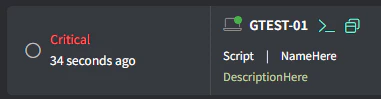 ([**ولّد تنبيهًا تجريبيًا**](/generate-a-test-alert) إذا لم تر شيئًا).
3. انقر على زر **Create Ticket** في أقصى اليمين:
([**ولّد تنبيهًا تجريبيًا**](/generate-a-test-alert) إذا لم تر شيئًا).
3. انقر على زر **Create Ticket** في أقصى اليمين:
 4. املأ التفاصيل المناسبة وانقر على **Create**.