> ## Documentation Index
> Fetch the complete documentation index at: https://help.gorelo.io/llms.txt
> Use this file to discover all available pages before exploring further.
# استخدام المتغيرات في وقت التشغيل
> استخدم متغيرات النصوص البرمجية في Gorelo التي تُترك فارغة في وقت التصميم لطلب الإدخال خلال عمليات التشغيل عبر CLI، مثالية لـ Wake on LAN ومهام PowerShell المخصصة.
يمكنك ترك متغير نص برمجي فارغًا وجعله يطلب من المستخدم الإدخال عند التشغيل عند الطلب عبر CLI. هذا المثال يرسل حزمة WOL إلى عنوان MAC يتم إدخاله في وقت التشغيل.
1. انتقل إلى **[Scripts](https://app.gorelo.io/Asset/script-list).**
2. أنشئ نصًا برمجيًا بالتفاصيل التالية:
* **Name**: Wake on LAN
* **Content**:
```powershell theme={null}
$MacToWake = $gorelo:MacToWake
function Send-WoL {
[CmdletBinding()]
param(
[Parameter(Mandatory)]
[string]$MacAddress,
# Optional: force a specific interface by alias (e.g., "Wi-Fi")
[string]$InterfaceAlias
)
# --- Normalize & validate MAC ---
$norm = $MacAddress -replace '[:\-\. ]',''
if ($norm -notmatch '^[0-9A-Fa-f]{12}$') { throw "Invalid MAC after normalization: '$norm'." }
$macBytes = New-Object byte[] 6
for ($i = 0; $i -lt 12; $i += 2) { $macBytes[$i/2] = [Convert]::ToByte($norm.Substring($i,2),16) }
# --- Build magic packet ---
$packet = New-Object byte[] (6 + 16*6)
for ($i=0; $i -lt 6; $i++) { $packet[$i] = 0xFF }
for ($block=0; $block -lt 16; $block++) { [Array]::Copy($macBytes, 0, $packet, 6 + ($block*6), 6) }
# --- Pick active IPv4 from interface with best default route (0.0.0.0/0) ---
$route = Get-NetRoute -DestinationPrefix '0.0.0.0/0' -ErrorAction SilentlyContinue |
Sort-Object -Property RouteMetric, InterfaceMetric |
Select-Object -First 1
$ipRec = $null
if ($InterfaceAlias) {
$ipRec = Get-NetIPAddress -AddressFamily IPv4 -InterfaceAlias $InterfaceAlias -ErrorAction SilentlyContinue |
Where-Object { $_.IPAddress -notlike '169.254*' -and $_.IPAddress -ne '127.0.0.1' } |
Sort-Object -Property PrefixLength -Descending |
Select-Object -First 1
}
if (-not $ipRec -and $route) {
$ipRec = Get-NetIPAddress -AddressFamily IPv4 -InterfaceIndex $route.InterfaceIndex -ErrorAction SilentlyContinue |
Where-Object { $_.IPAddress -notlike '169.254*' -and $_.IPAddress -ne '127.0.0.1' } |
Select-Object -First 1
}
if (-not $ipRec) {
$ipRec = Get-NetIPAddress -AddressFamily IPv4 -ErrorAction SilentlyContinue |
Where-Object { $_.IPAddress -notlike '169.254*' -and $_.IPAddress -ne '127.0.0.1' } |
Select-Object -First 1
}
if (-not $ipRec) { throw "Couldn't detect a valid IPv4 address." }
$ipBytes = ([System.Net.IPAddress]::Parse($ipRec.IPAddress)).GetAddressBytes()
$prefix = [int]$ipRec.PrefixLength
# --- Build subnet mask bytes from prefix length (no Int32 conversion) ---
$maskBytes = 0,0,0,0
$bits = $prefix
for ($i=0; $i -lt 4; $i++) {
if ($bits -ge 8) { $maskBytes[$i] = 255; $bits -= 8 }
elseif ($bits -gt 0) {
$maskBytes[$i] = (0xFF - ( [math]::Pow(2, (8 - $bits)) - 1 )) -band 0xFF
$bits = 0
} else { $maskBytes[$i] = 0 }
}
# --- Compute broadcast: ip OR (NOT mask) (byte-wise) ---
$broadcastBytes = New-Object byte[] 4
for ($i=0; $i -lt 4; $i++) {
$invMask = (0xFF - $maskBytes[$i]) -band 0xFF
$broadcastBytes[$i] = ($ipBytes[$i] -bor $invMask) -band 0xFF
}
$broadcast = [System.Net.IPAddress]::new($broadcastBytes)
# --- Send to common WoL ports ---
foreach ($port in 9,7) {
$udp = New-Object System.Net.Sockets.UdpClient
$udp.EnableBroadcast = $true
$endpoint = New-Object System.Net.IPEndPoint $broadcast, $port
[void]$udp.Send($packet, $packet.Length, $endpoint)
$udp.Close()
Write-Host "Magic packet sent to $MacAddress via $($broadcast.ToString()):$port"
}
}
# Example:
# Send-WoL -MacAddress "98:FA:9B:55:B4:50"
# Or force a specific adapter:
# Send-WoL -MacAddress "98:FA:9B:55:B4:50" -InterfaceAlias "Wi-Fi"
# Example usage
Send-WoL -MacAddress $MacToWake
```
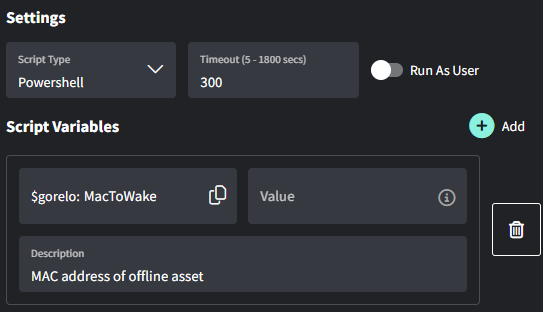 اكتب عنوان MAC إلى نص برمجي لحقل مخصص في **[هذا الدليل](/install-via-custom-fields).**