> ## Documentation Index
> Fetch the complete documentation index at: https://help.gorelo.io/llms.txt
> Use this file to discover all available pages before exploring further.
# 自动化工单标签
> 使用 Gorelo AI 根据工单主题和首条入站评论自动为新工单应用最多三个标签,消除手动打标签的工作。
Auto Ticket Tags 会查看工单的主题和首条入站公共评论,然后从你指定为 AI 标签的标签中选择最多三个。它消除了组织新工单时的猜测,让你能够专注于真正的工作,而无需担心手动打标签。
## 启用自动工单标签
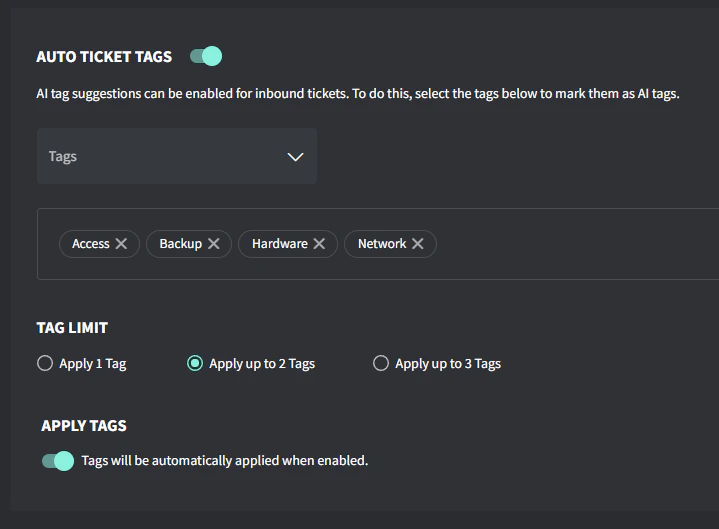
1. 转到 **Settings → AI → Auto Ticket Tags**
2. 打开 **Auto Ticket Tags** 开关
3. 选择你希望由 AI 评估的标签
4. 选择你希望建议的标签数量:1、2 或 3
5. 如果你希望标签自动应用,请打开 **Apply Tags** 开关
 ## 工作原理
* AI 会查看工单的主题和首条入站公共评论
* 将这些信息与你指定的标签的名称和描述进行比较
* 你可以在 **Settings → Tags → Ticket Tags** 下创建或编辑标签
## 创建供 AI 使用的标签
1. 前往 **Settings → Tags → Ticket Tags**。
2. 点击 **Create a Ticket Tag**(如果需要新标签)或 **Edit**(如果你要修改现有标签)。
3. 输入标签名称和描述(支持表情符号)
4. 勾选 **Mark as AI tag**,使其可以被自动工单标签功能识别。
5. 保存更改。
* 保持标签的标题和描述清晰具体,这有助于 AI 更准确地匹配。
* 如果你想测试 AI 的打标签效果,只需发送一个带有相关主题和评论的测试工单,看看它是否选择了正确的标签。
## 示例标签
| **Name** | **Description** |
| :---------- | :------------------------------------------------------------------------------------------------------------------------------------------------------------------------------------------------------------------------------------------ |
| Access | User access related requests including password resets, account creation/deletion, or permission changes. Examples: forgotten passwords, new user setup, or access denied messages. |
| Backup | Data backup and recovery related issues including failed backups, restore requests, or backup system alerts. Examples: backup failure notifications, file restore requests, or backup storage capacity issues. |
| Email | All email-related issues including Microsoft 365, Exchange, spam filtering, signatures or email client issues. Examples: cannot send/receive emails, missing emails, mailbox quota issues, or Outlook problems. |
| Mobile | Mobile device issues including phones, tablets, MDM, or mobile app problems. Examples: cannot sync email on phone, MDM enrollment issues, or mobile app failures. |
| Network | Issues related to internet connectivity, WiFi, switches, firewalls, routers, VPN connections, or network performance issues. Examples include: slow internet, cannot connect to WiFi, VPN disconnecting, or network outages. |
| Print/Scan | Issues with network printers, local printers, multi-function devices, and scanning equipment. Examples: cannot print, print quality problems, printer offline, scan failures, or driver issues. |
| Security | Security-related incidents, alerts, or requests including virus infections, suspicious activities, security policy changes, or compliance matters. Examples: virus alerts, suspicious emails, ransomware, or security policy violations. |
| Server | Issues involving physical or virtual servers, including performance problems, services not running, server hardware failures, or server maintenance. Examples: server offline, service crashes, disk space alerts, or slow server response. |
| Software | Issues with business applications, software installations, updates, Microsoft Office like Word/Excel, or licensing. Examples: application errors, software not working, update failures, or license activation issues. |
| Voice | Issues with VoIP phones, phone systems, PBX, softphones, and video conferencing. Examples: phone not registering, poor call quality, voicemail, or conference room systems. |
| Web | Issues with websites, DNS, domains, SSL certificates, and hosting. Examples: site down, certificate expired, DNS errors, or domain renewals |
| Workstation | Desktop and laptop computer issues including hardware failures, operating system problems, or performance issues. Examples: blue screens, slow computer, hardware not working, or Windows updates. |
## 工作原理
* AI 会查看工单的主题和首条入站公共评论
* 将这些信息与你指定的标签的名称和描述进行比较
* 你可以在 **Settings → Tags → Ticket Tags** 下创建或编辑标签
## 创建供 AI 使用的标签
1. 前往 **Settings → Tags → Ticket Tags**。
2. 点击 **Create a Ticket Tag**(如果需要新标签)或 **Edit**(如果你要修改现有标签)。
3. 输入标签名称和描述(支持表情符号)
4. 勾选 **Mark as AI tag**,使其可以被自动工单标签功能识别。
5. 保存更改。
* 保持标签的标题和描述清晰具体,这有助于 AI 更准确地匹配。
* 如果你想测试 AI 的打标签效果,只需发送一个带有相关主题和评论的测试工单,看看它是否选择了正确的标签。
## 示例标签
| **Name** | **Description** |
| :---------- | :------------------------------------------------------------------------------------------------------------------------------------------------------------------------------------------------------------------------------------------ |
| Access | User access related requests including password resets, account creation/deletion, or permission changes. Examples: forgotten passwords, new user setup, or access denied messages. |
| Backup | Data backup and recovery related issues including failed backups, restore requests, or backup system alerts. Examples: backup failure notifications, file restore requests, or backup storage capacity issues. |
| Email | All email-related issues including Microsoft 365, Exchange, spam filtering, signatures or email client issues. Examples: cannot send/receive emails, missing emails, mailbox quota issues, or Outlook problems. |
| Mobile | Mobile device issues including phones, tablets, MDM, or mobile app problems. Examples: cannot sync email on phone, MDM enrollment issues, or mobile app failures. |
| Network | Issues related to internet connectivity, WiFi, switches, firewalls, routers, VPN connections, or network performance issues. Examples include: slow internet, cannot connect to WiFi, VPN disconnecting, or network outages. |
| Print/Scan | Issues with network printers, local printers, multi-function devices, and scanning equipment. Examples: cannot print, print quality problems, printer offline, scan failures, or driver issues. |
| Security | Security-related incidents, alerts, or requests including virus infections, suspicious activities, security policy changes, or compliance matters. Examples: virus alerts, suspicious emails, ransomware, or security policy violations. |
| Server | Issues involving physical or virtual servers, including performance problems, services not running, server hardware failures, or server maintenance. Examples: server offline, service crashes, disk space alerts, or slow server response. |
| Software | Issues with business applications, software installations, updates, Microsoft Office like Word/Excel, or licensing. Examples: application errors, software not working, update failures, or license activation issues. |
| Voice | Issues with VoIP phones, phone systems, PBX, softphones, and video conferencing. Examples: phone not registering, poor call quality, voicemail, or conference room systems. |
| Web | Issues with websites, DNS, domains, SSL certificates, and hosting. Examples: site down, certificate expired, DNS errors, or domain renewals |
| Workstation | Desktop and laptop computer issues including hardware failures, operating system problems, or performance issues. Examples: blue screens, slow computer, hardware not working, or Windows updates. |