> ## Documentation Index
> Fetch the complete documentation index at: https://help.gorelo.io/llms.txt
> Use this file to discover all available pages before exploring further.
# 自动解决并关闭
> 在 Gorelo 中构建工单快捷方式以自动执行重复操作,如预设回复、解决并关闭工作流以及一键项目基线。
工单快捷方式(Ticket Shortcuts)通过自动化操作保持事物一致并节省时间。你可以将工单快捷方式用于像预设回复这样的基础操作,甚至像项目基线这样更复杂的操作。
## 创建工单快捷方式
1. 导航到 **Settings** —> **Tickets** —> [**Shortcuts**](https://app.gorelo.io/Admin/admin-settings#ticket#shortcuts)
2. 点击右上角的 "**Add Shortcut**"
3. 填写必要字段:
* **Name**:这是快捷方式的名称,将用于搜索它(在工单详情中)
* **Description**:在此处可以更详细地描述快捷方式。在搜索时(在工单详情中)将鼠标悬停在名称旁的 ℹ️ 图标上时显示
* **Visibility**:定义谁可以看到/使用该快捷方式
* **Public**:你组织中的每个人
* **Private**:仅你
* **Groups**:仅指定组中的用户
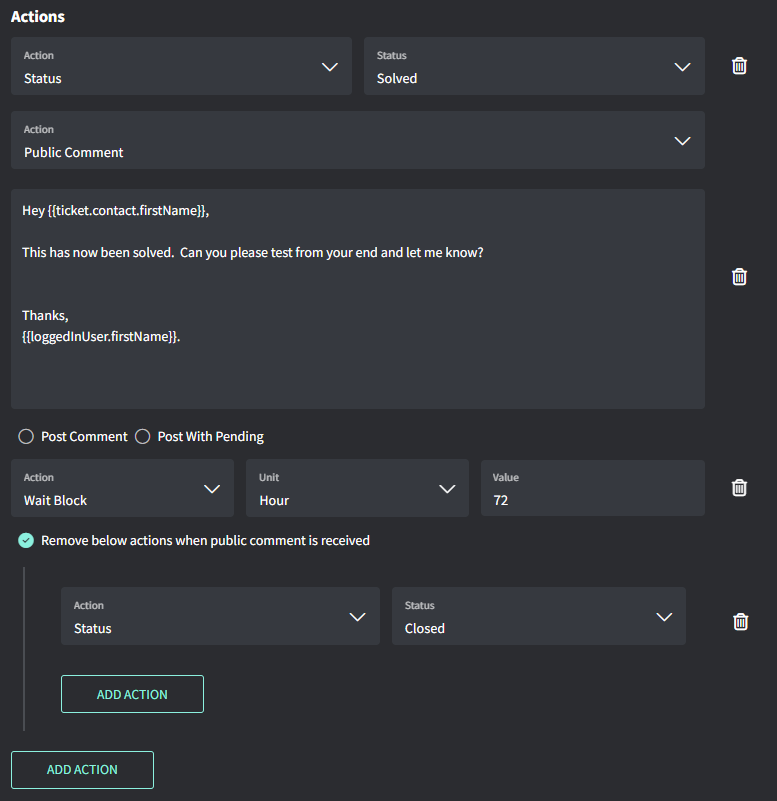
4. 添加 **Actions**(见下面的示例)
5. 点击 "**Create**"
## 示例:解决并关闭工单
* 立即标记为 **Solved**
* 立即插入**公共评论**草稿
* 等待 72 小时
* 标记为 **Closed**(如果未收到公共评论回复)