> ## Documentation Index
> Fetch the complete documentation index at: https://help.gorelo.io/llms.txt
> Use this file to discover all available pages before exploring further.
# 从告警创建工单
> 从告警列表将 Gorelo 告警转换为工单,让技术人员可以调查问题、跟踪解决方案,并对任何相关工作进行计费。
1. 从主菜单导航到 [**Alerts List**](https://app.gorelo.io/Alert/alerts)。
2. 在 Everything 视图中,你应该会看到带有以下详细信息的新生成告警(但资产名称不同):
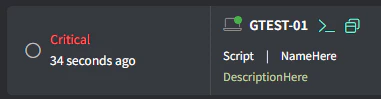 (如果你没看到任何内容,请[**生成测试告警**](/generate-a-test-alert))。
3. 点击最右侧的 **Create Ticket** 按钮:
(如果你没看到任何内容,请[**生成测试告警**](/generate-a-test-alert))。
3. 点击最右侧的 **Create Ticket** 按钮:
 4. 填写适当的详细信息并点击 **Create**。