> ## Documentation Index
> Fetch the complete documentation index at: https://help.gorelo.io/llms.txt
> Use this file to discover all available pages before exploring further.
# 过滤垃圾邮件
> 使用 Gorelo Spam 视图在可疑邮件到达工单队列之前拦截它们,审查发件人、评分和收件人,然后取消标记为垃圾邮件或屏蔽它们。
一个专门的 Spam 视图,用于在可疑邮件到达工单队列之前管理它们。
可以通过 [**Ticket List**](https://app.gorelo.io/Ticket/ticket-list) → Spam(在 "Create a View" 按钮上方)访问 **Spam** 视图
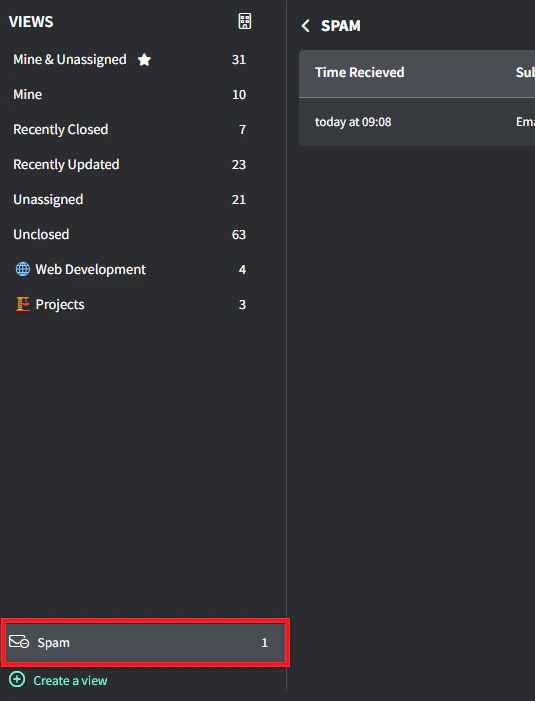 系统拦截潜在的垃圾邮件并保留以供审查,显示:
* 收到时间
* 主题
* 发件人
* 垃圾邮件评分
* 收件人
系统拦截潜在的垃圾邮件并保留以供审查,显示:
* 收到时间
* 主题
* 发件人
* 垃圾邮件评分
* 收件人
 每封被拦截的邮件提供两个操作:
* **Create Ticket**:将合法邮件转换为工单
* **Delete**:删除不需要的邮件(无法撤销)
目前,Gorelo 的过滤阈值非常保守,以最小化误报。随着邮件量的增加和模式的出现,保护级别将提高。
每封被拦截的邮件提供两个操作:
* **Create Ticket**:将合法邮件转换为工单
* **Delete**:删除不需要的邮件(无法撤销)
目前,Gorelo 的过滤阈值非常保守,以最小化误报。随着邮件量的增加和模式的出现,保护级别将提高。