> ## Documentation Index
> Fetch the complete documentation index at: https://help.gorelo.io/llms.txt
> Use this file to discover all available pages before exploring further.
# 什么是表单
> Gorelo 中的表单从最终用户那里捕获信息,用于硬件请求、用户生命周期、客户入职等,并提供名称和描述设置。
## 表单设置
### 名称
要更改表单的内部名称:
1. 从菜单导航到 [**Forms**](https://app.gorelo.io/form/form-list)
2. 在左侧选择表单
3. 点击现有表单名称右侧的编辑图标
 4. 更改名称并点击 "Update"
### 描述
要更改表单的内部描述:
1. 从菜单导航到 [**Forms**](https://app.gorelo.io/form/form-list)
2. 在左侧选择表单
3. 点击描述字段右侧的编辑图标
4. 更改名称并点击 "Update"
### 描述
要更改表单的内部描述:
1. 从菜单导航到 [**Forms**](https://app.gorelo.io/form/form-list)
2. 在左侧选择表单
3. 点击描述字段右侧的编辑图标
 4. 添加/更改描述并点击保存图标
### 组
可以自动将一个或多个组添加到通过表单创建的工单。你还可以选择在创建工单时通知这些组。
1. 从菜单导航到 [**Forms**](https://app.gorelo.io/form/form-list)
2. 在左侧选择表单
3. 选择 **Settings** 选项卡
4. 通过下拉菜单选择你希望自动应用的组
4. 添加/更改描述并点击保存图标
### 组
可以自动将一个或多个组添加到通过表单创建的工单。你还可以选择在创建工单时通知这些组。
1. 从菜单导航到 [**Forms**](https://app.gorelo.io/form/form-list)
2. 在左侧选择表单
3. 选择 **Settings** 选项卡
4. 通过下拉菜单选择你希望自动应用的组
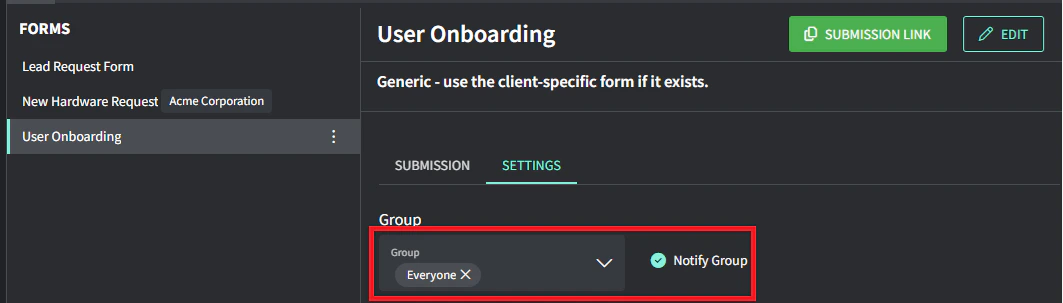 5. 打开 **Notify group** 开关,以便在通过此表单创建工单时向这些组成员生成通知
6. 点击底部的 **Save changes**
### 标签
可以自动将一个或多个标签添加到通过表单创建的工单。
1. 从菜单导航到 [**Forms**](https://app.gorelo.io/form/form-list)
2. 在左侧选择表单
3. 选择 **Settings** 选项卡
4. 通过下拉菜单选择你希望自动应用的标签
5. 打开 **Notify group** 开关,以便在通过此表单创建工单时向这些组成员生成通知
6. 点击底部的 **Save changes**
### 标签
可以自动将一个或多个标签添加到通过表单创建的工单。
1. 从菜单导航到 [**Forms**](https://app.gorelo.io/form/form-list)
2. 在左侧选择表单
3. 选择 **Settings** 选项卡
4. 通过下拉菜单选择你希望自动应用的标签
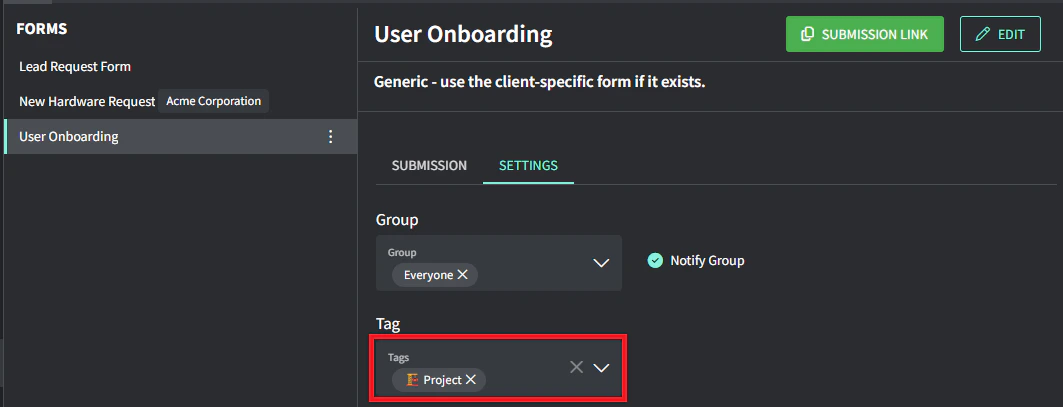 5. 点击底部的 **Save changes**
### 客户
可以设置表单,仅让某些客户访问。这是从现有工单生成表单链接时减少混乱的好方法。
1. 从菜单导航到 [**Forms**](https://app.gorelo.io/form/form-list)
2. 在左侧选择表单
3. 选择 **Settings** 选项卡
4. 通过下拉菜单选择你希望自动应用的标签
5. 点击底部的 **Save changes**
### 客户
可以设置表单,仅让某些客户访问。这是从现有工单生成表单链接时减少混乱的好方法。
1. 从菜单导航到 [**Forms**](https://app.gorelo.io/form/form-list)
2. 在左侧选择表单
3. 选择 **Settings** 选项卡
4. 通过下拉菜单选择你希望自动应用的标签
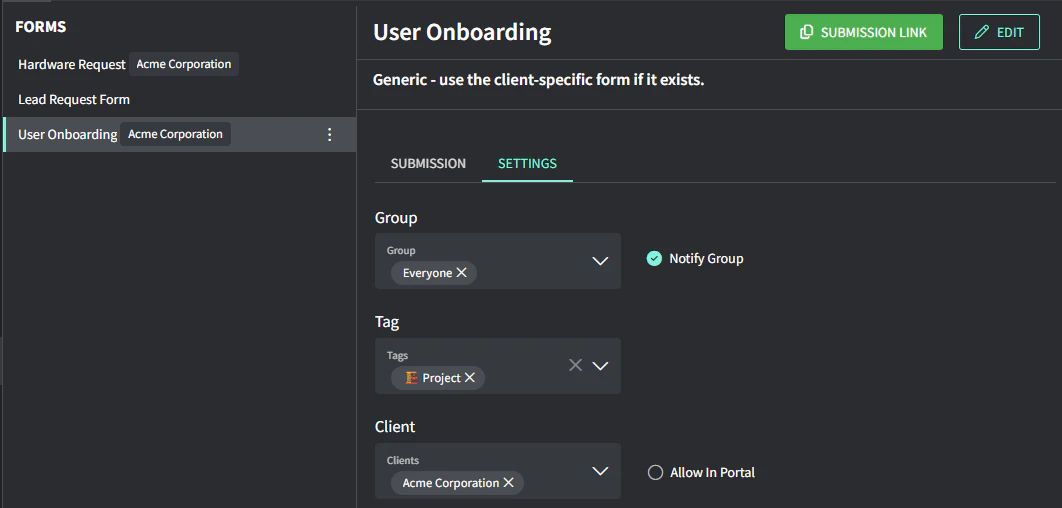 5. 点击底部的 **Save changes**