> ## Documentation Index
> Fetch the complete documentation index at: https://help.gorelo.io/llms.txt
> Use this file to discover all available pages before exploring further.
# 生成表单链接
> 为 Gorelo 表单生成一次性提交链接,可通过邮件或直接从现有工单与客户共享,用于自助数据捕获。
1. 从菜单导航到 [**Forms**](https://app.gorelo.io/form/form-list)。
2. 在左侧选择表单。
3. 点击右上角的 **Submission Link** 按钮以复制链接。
**提示!**
* 表单链接是一次性使用的,将在 7 天后过期
* 此表单将根据 [**Form Settings**](/forms-overview#form-settings) 生成新工单
## 从现有工单生成表单链接
1. 创建或导航到现有工单。
2. 在评论框中点击 **public comment**。
 3. 输入 **Click here** 并高亮显示 **here** 这个词。
4. 点击 **Generate form link** 按钮。
3. 输入 **Click here** 并高亮显示 **here** 这个词。
4. 点击 **Generate form link** 按钮。
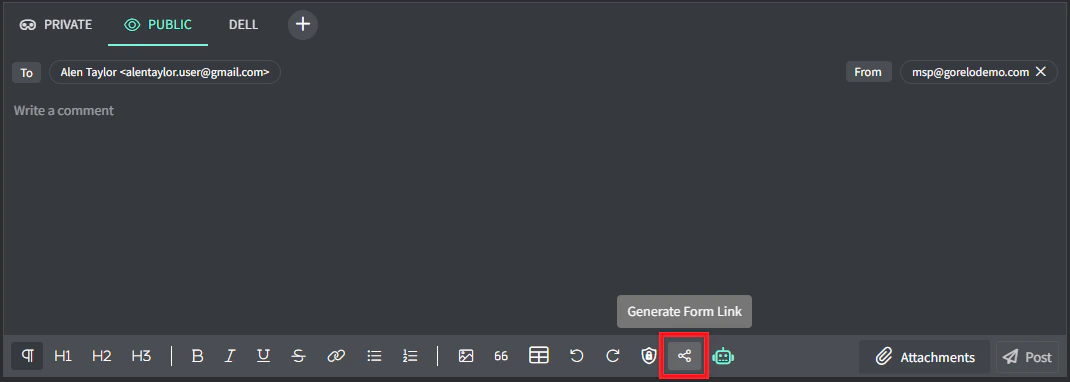 5. 点击适当的表单以链接。
**提示!**
* 表单链接是一次性使用的,将在 7 天后过期。
* 此表单将在现有工单上生成提交。
5. 点击适当的表单以链接。
**提示!**
* 表单链接是一次性使用的,将在 7 天后过期。
* 此表单将在现有工单上生成提交。