> ## Documentation Index
> Fetch the complete documentation index at: https://help.gorelo.io/llms.txt
> Use this file to discover all available pages before exploring further.
# 使用标签分组资产
> 在 Gorelo 中使用由应用程序、服务、注册表项或 Windows 功能驱动的内置和自定义标签对资产进行分组,以便定位策略和运行脚本。
## 自定义标签
1. 导航到 Settings > [**Tags**](https://app.gorelo.io/Admin/admin-settings#tagmanagementsettings) > Asset Policy Tags。
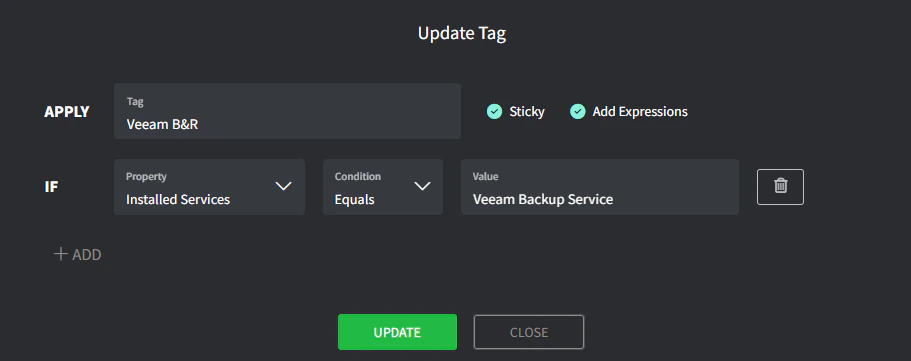
2. 创建一个资产标签(在底部):
* **Tag**:这是标签的名称(例如 *Veeam B\&R*)。
* **Sticky**:可以自动添加但不会自动删除该标签。
* **Property**:从 Apps、Services、Registry Key 和 Windows Features 中选择。
* **Condition**:选择适当的条件。
* **Value**:输入预期的值。
 **标签表达式**大约每 6 小时评估一次,并在 [Gorelo.Rmm.Shell](http://Gorelo.Rmm.Shell) 服务启动时立即评估(首次启动或手动启动时)。
当你附加了带有重要检查(如备份监控)的策略时,应使用 **Sticky**。如果有人意外卸载了 Veeam,标签将保留,Veeam 备份检查将继续告警。\
当表达式不再匹配时,可以手动删除这些标签。
**标签表达式**大约每 6 小时评估一次,并在 [Gorelo.Rmm.Shell](http://Gorelo.Rmm.Shell) 服务启动时立即评估(首次启动或手动启动时)。
当你附加了带有重要检查(如备份监控)的策略时,应使用 **Sticky**。如果有人意外卸载了 Veeam,标签将保留,Veeam 备份检查将继续告警。\
当表达式不再匹配时,可以手动删除这些标签。