> ## Documentation Index
> Fetch the complete documentation index at: https://help.gorelo.io/llms.txt
> Use this file to discover all available pages before exploring further.
# 使用动态数量跟踪未计费项目
> 在 Gorelo 中使用动态数量从资产标签、联系人标签和 Pax8 订阅自动化合同计费,呈现未计费项目以供审核。
动态数量用于通过增加/减少产品/捆绑包的数量来自动化你的计费,并建议尚未计费的内容。当前支持**资产标签**、**联系人标签**(M365)和 **Pax8** 订阅。
## 设置规则
然后点击右上角的 **Dynamic Quantities**。
你会看到 Gorelo 从每个 **Source** 检测到的**动态元素**。
示例:Source 为 **Asset Tag**,动态元素为 **Windows Workstation**。
 选择当检测到此动态元素(且当前未映射到合同)时希望发生的操作。
* **Unmapped**:此元素将出现在 **Pending** 选项卡和每个合同上,等待你映射产品/捆绑包。
* **Suggest**:选择要建议的产品/捆绑包。此元素将出现在 **Pending** 选项卡和每个合同上,等待你点击 "Add",因为已建议产品/捆绑包。
* **Ignore**:此元素不会出现在 Pending 选项卡或每个合同上。
## 查看待处理项目
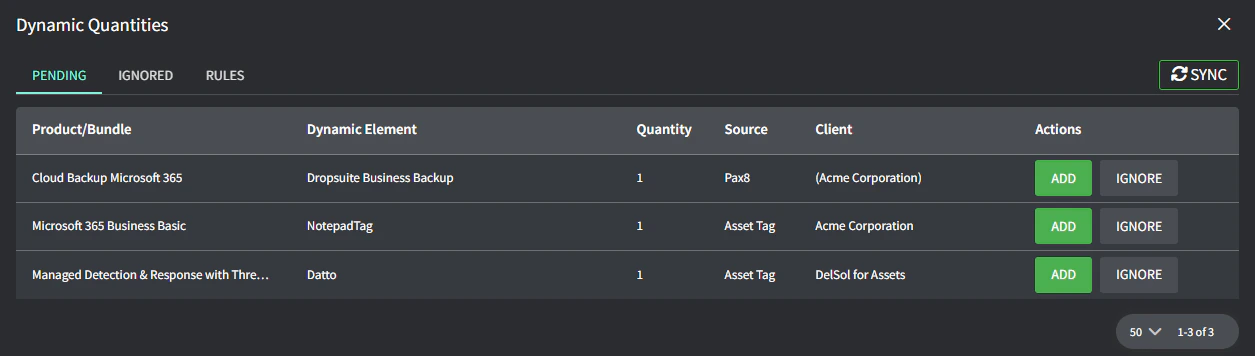
你应定期检查此 Pending 选项卡,以确保你对所有内容计费。出现在此处的任何内容都应添加到合同、单独忽略或通过 Rules 选项卡忽略。
你会看到所有待添加到合同的动态元素:
* **Add** 会将你导航到客户的合同(或合同列表),让你可以从那里添加。
选择当检测到此动态元素(且当前未映射到合同)时希望发生的操作。
* **Unmapped**:此元素将出现在 **Pending** 选项卡和每个合同上,等待你映射产品/捆绑包。
* **Suggest**:选择要建议的产品/捆绑包。此元素将出现在 **Pending** 选项卡和每个合同上,等待你点击 "Add",因为已建议产品/捆绑包。
* **Ignore**:此元素不会出现在 Pending 选项卡或每个合同上。
## 查看待处理项目
你应定期检查此 Pending 选项卡,以确保你对所有内容计费。出现在此处的任何内容都应添加到合同、单独忽略或通过 Rules 选项卡忽略。
你会看到所有待添加到合同的动态元素:
* **Add** 会将你导航到客户的合同(或合同列表),让你可以从那里添加。
 * **Ignore** 会仅为这个特定客户隐藏此特定动态元素(并出现在 Ignored 选项卡中)
