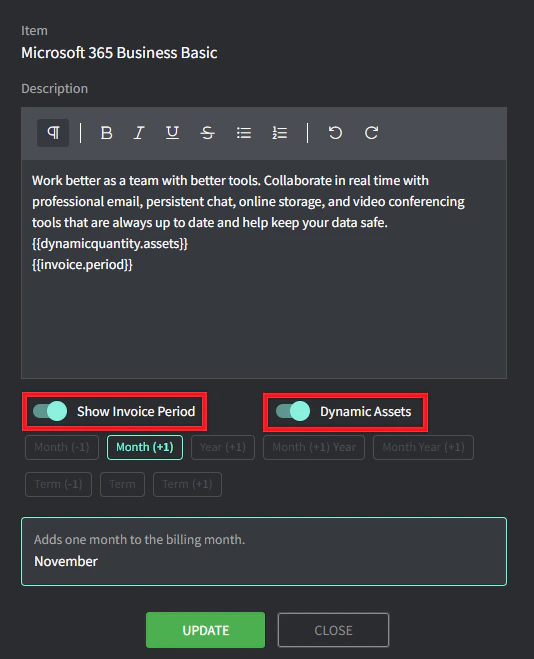
Navigate to Settings —> Billing —> [**Invoice Template**](https://app.gorelo.io/Admin/admin-settings#billing#invoicetemplate) to create and customize | | **Invoice Email Template** | The invoice email sent to the selected contacts is based on this selection.
Navigate to Settings —> Email —> [**Settings**](https://app.gorelo.io/Admin/admin-settings#email#settings) and edit your Invoice email address. You can then create and customize via the Email Template Management tab. | | **Xero Branding Theme** (only for Xero) | Specify the branding theme used in Xero — this allows for automatic payments via third-party providers, e.g., Payrix, Pinch | | **Reference** | The name of the invoice — template fields can be used here such as billingmonth, contractgroupname and locationname. | | **Auto Approve & Send** | The contract will create a draft invoice when this is toggled off (default). Toggle this on and select contacts to have the contract automatically create the invoice, send to the contact and sync to Xero/QBO. | ### Invoice creation examples * **Example 1**: Start Date of **January 1st 2025** with a Repeat Period of **Monthly** and Invoice Creation **0** days before — the second coverage period would start on February 1st 2025 and the invoice would generate on **February 1st 2025** * **Example 2**: Start Date of **January 1st 2025** with a Repeat Period of **Monthly** and Invoice Creation **7** days before — the second coverage period would start on February 1st 2025 and the invoice would generate on **January 25th 2025** ### Invoice due examples * **Example 1**: Start Date of **January 1st 2025** with a Repeat Period of **Monthly,** Invoice Creation **0** days before and Invoice Due **0** days later — the second coverage period would start on February 1st 2025, the invoice would generate on **February 1st 2025** and the invoice would be due on **February 1st 2025** * **Example 2**: Start Date of **January 1st 2025** with a Repeat Period of **Monthly,** Invoice Creation **0** days before and Invoice Due **7** days later — the second coverage period would start on February 1st 2025, the invoice would generate on **February 1st 2025** and the invoice would be due on **February 8th 2025** * **Example 3**: Start Date of **January 1st 2025** with a Repeat Period of **Monthly,** Invoice Creation **7** days before and Invoice Due **7** days later — the second coverage period would start on February 1st 2025, the invoice would generate on **January 25th 2025** and the invoice would be due on **February 1st 2025**
 * **Example 1**: **Remote Support** performed by a **technician** would be covered ✅.
* **Example 2**: **Onsite (Off Hours)** performed by a **technician** wouldn’t be covered and instead flow through to default labor rates or an alternate contract ❌.
### Per hour
Labor is billed at the rates specified.
| Rate | Usage |
| :---------------------------- | :------------------------------------------------------------------------------------------------------------------------------------------------------------------- |
| ***Use default labor rates*** | Allows you to use the default rates but then give you the option to choose which Work Type and Billing Role combinations are automatically covered by this contract. |
| ***Use fixed labor rate*** | Allows you to set a fixed rate that overrides all selected Work Type and Billing Role combinations. |
| ***Use custom labor rates*** | Allows you to override individual Work Type and Billing Roles and choose which Work Type and Billing Role combinations are automatically covered by this contract. |
### Block hours (one-time top up)
Labor is deducted from a block of hours that have been purchased upfront. You invoice it once and it doesn't renew.
* Navigate to Settings > Billing > [**Block Hour Templates**](https://app.gorelo.io/Admin/admin-settings#billing#blockhourstemplate) and create your templates (for example, a block of 10 hours).
* The initial **price** and **Block Balance** is what flows through the first invoice.
| Section | Usage |
| :-------------------- | :------------------------------------------------------------------------------------------------------------------------------------------------------------------------------------------------------------------------------------------------------ |
| **Warning Threshold** | Determines at what percentage of the remaining hours a client banner appears. For example, 10 hours with a 20% threshold shows the client banner when 2 hours remain. |
| **Overrun Threshold** | Determines whether time can still be billed even though 0 hours remain. For example, 10 hours with a 30% overrun allows up to 3 hours to be billed even though 0 hours remain. The next top-up of block hours immediately consumes these overrun hours. |
| **Covered Items** | Define which combination of Work Type and Billing Roles will automatically be covered by the contract. |
### Limited hours (recurring invoice)
Labor is capped at a specific number of hours and then billed on a per-hour basis when that cap is exceeded. It renews at the start of each month.
* The **Allocated hours** section is where you’ll set the maximum hours that are covered by the contract.
* You then specify how **excess hours** will be billed (see **Per hour**).
### No labor
The contract does not include any labor component. Use this option when the contract only covers products or recurring fees.
* **Example 1**: **Remote Support** performed by a **technician** would be covered ✅.
* **Example 2**: **Onsite (Off Hours)** performed by a **technician** wouldn’t be covered and instead flow through to default labor rates or an alternate contract ❌.
### Per hour
Labor is billed at the rates specified.
| Rate | Usage |
| :---------------------------- | :------------------------------------------------------------------------------------------------------------------------------------------------------------------- |
| ***Use default labor rates*** | Allows you to use the default rates but then give you the option to choose which Work Type and Billing Role combinations are automatically covered by this contract. |
| ***Use fixed labor rate*** | Allows you to set a fixed rate that overrides all selected Work Type and Billing Role combinations. |
| ***Use custom labor rates*** | Allows you to override individual Work Type and Billing Roles and choose which Work Type and Billing Role combinations are automatically covered by this contract. |
### Block hours (one-time top up)
Labor is deducted from a block of hours that have been purchased upfront. You invoice it once and it doesn't renew.
* Navigate to Settings > Billing > [**Block Hour Templates**](https://app.gorelo.io/Admin/admin-settings#billing#blockhourstemplate) and create your templates (for example, a block of 10 hours).
* The initial **price** and **Block Balance** is what flows through the first invoice.
| Section | Usage |
| :-------------------- | :------------------------------------------------------------------------------------------------------------------------------------------------------------------------------------------------------------------------------------------------------ |
| **Warning Threshold** | Determines at what percentage of the remaining hours a client banner appears. For example, 10 hours with a 20% threshold shows the client banner when 2 hours remain. |
| **Overrun Threshold** | Determines whether time can still be billed even though 0 hours remain. For example, 10 hours with a 30% overrun allows up to 3 hours to be billed even though 0 hours remain. The next top-up of block hours immediately consumes these overrun hours. |
| **Covered Items** | Define which combination of Work Type and Billing Roles will automatically be covered by the contract. |
### Limited hours (recurring invoice)
Labor is capped at a specific number of hours and then billed on a per-hour basis when that cap is exceeded. It renews at the start of each month.
* The **Allocated hours** section is where you’ll set the maximum hours that are covered by the contract.
* You then specify how **excess hours** will be billed (see **Per hour**).
### No labor
The contract does not include any labor component. Use this option when the contract only covers products or recurring fees.