> ## Documentation Index
> Fetch the complete documentation index at: https://help.gorelo.io/llms.txt
> Use this file to discover all available pages before exploring further.
# Create a separate conversation on the same ticket
> Use Third-Party Conversations in Gorelo to start a separate email thread on the same ticket, keeping vendor communication organized without exposing the client.
Create a Third-Party Conversation to start a new email thread while keeping it on the same ticket for context. For example, contact LOB application support for a client without losing the ticket history.
This creates a new conversation thread, separate from the Public thread. With a new Third Party Conversation thread, you don't include the recipients (in To/Cc) previously included in the ticket.
## Create a third-party conversation
1. Create or navigate to an existing ticket
2. Click the **+** button in the timeline tab and add a **Third Party Conversation**
3. Search from existing contacts or type a name/email
* (Optional) Add Cc’s via the ‘Add more detail’ dropdown
* Public comment thread can be added via the ‘Add more detail’ dropdown
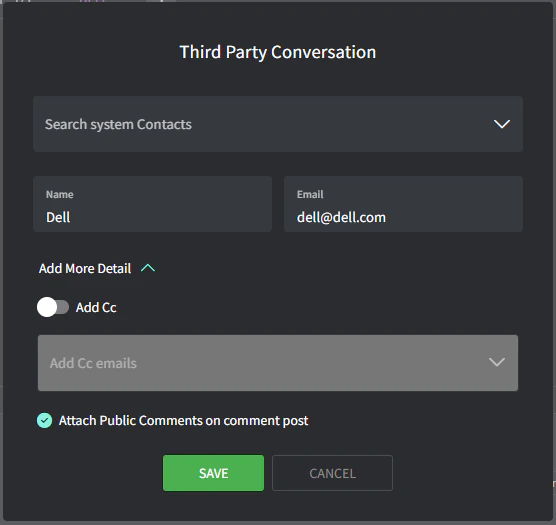 1. Click ‘**Save**’
2. Type your email in the expanded **Third Party Conversation** comment box and click ‘**Post**’ (note the purple tab color)
1. Click ‘**Save**’
2. Type your email in the expanded **Third Party Conversation** comment box and click ‘**Post**’ (note the purple tab color)
 ## Thread visibility
Threads have different visibility levels:
* **Private:** visible only by you and your team from the Gorelo admin interface.
* **Public:** visible by your contact by email.
* **Thread:** visible by a third party by email.
## Thread visibility
Threads have different visibility levels:
* **Private:** visible only by you and your team from the Gorelo admin interface.
* **Public:** visible by your contact by email.
* **Thread:** visible by a third party by email.