> ## Documentation Index
> Fetch the complete documentation index at: https://help.gorelo.io/llms.txt
> Use this file to discover all available pages before exploring further.
# Create an expiration rule for tickets
> Create expiration rules in Gorelo to generate alerts when domains, warranties, or contracts approach expiry, with multiple thresholds and client filters.
You can create expiration rules to alert when certain things are expiring: domains, warranty, and contracts.
1. Navigate to Settings —> Automation —> [**Expirations**](https://app.gorelo.io/admin/admin-settings#automation#expirations)
2. Click ‘**+Add Expiration**’ in the top-right
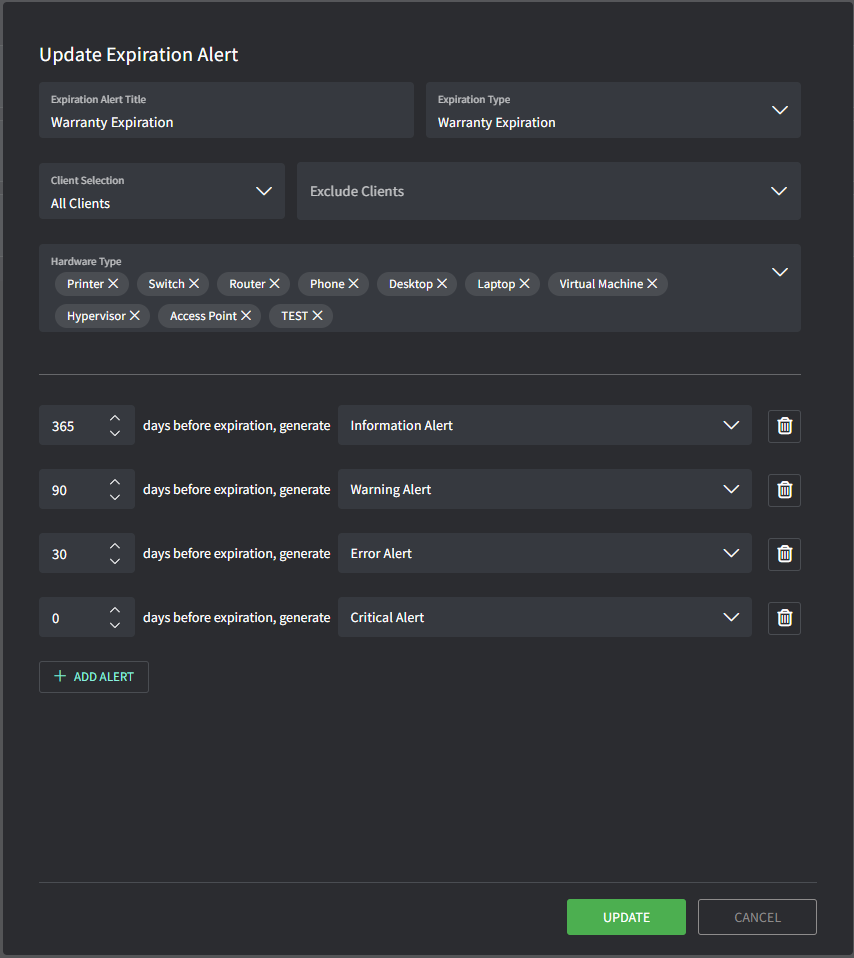
3. Enter details to configure the expiration rule:
* **Title**: this will be the name of the rule (does not appear in the alert)
* **Expiration Type**: this determines what date field the rule applies to such as
domains, warranty, and contracts.
* **Client Selection**: this allows you to include/exclude which clients the rule will apply to
* **Hardware Type**: this is only for the Warranty Expiration type and allows you to filter by specific hardware types
* **Add Alert**: this allows you to add multiple thresholds for generating an alert based on days remaining
 Tips!
* Alerts will trigger based on the organization Time Zone\
(Settings → General → [**Organization**](https://app.gorelo.io/Admin/admin-settings#general#organization)→ Business Hours)
* 12:00 AM – Asset Warranty
* 1:00 AM – Domain Expiration
* 2:00 AM – Contract Expiration
Tips!
* Alerts will trigger based on the organization Time Zone\
(Settings → General → [**Organization**](https://app.gorelo.io/Admin/admin-settings#general#organization)→ Business Hours)
* 12:00 AM – Asset Warranty
* 1:00 AM – Domain Expiration
* 2:00 AM – Contract Expiration