> ## Documentation Index
> Fetch the complete documentation index at: https://help.gorelo.io/llms.txt
> Use this file to discover all available pages before exploring further.
# Create a ticket from an alert
> Convert a Gorelo alert into a ticket from the Alerts list so technicians can investigate the issue, track resolution, and bill any associated work.
1. Navigate to the [**Alerts List**](https://app.gorelo.io/Alert/alerts) from the main menu.
2. In the Everything view, you should see the newly generated alert with the following details (but a different asset name):
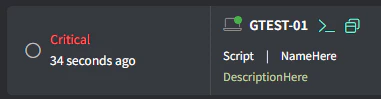 ([**Generate a test alert**](/generate-a-test-alert) if you do not see anything).
3. Click the **Create Ticket** button on the far right:
([**Generate a test alert**](/generate-a-test-alert) if you do not see anything).
3. Click the **Create Ticket** button on the far right:
 4. Fill in the appropriate details and click **Create**.