> ## Documentation Index
> Fetch the complete documentation index at: https://help.gorelo.io/llms.txt
> Use this file to discover all available pages before exploring further.
# Dismiss alerts
> Dismiss alerts in Gorelo to clear a specific occurrence and stack from the list without stopping future alerts, with tips on critical mobile subscriptions.
Dismissing clears just that particular occurrence (and its stack), but doesn't stop future occurrences from generating.
1. Navigate to the [**Alerts List**](https://app.gorelo.io/Alert/alerts) from the main menu.
2. In the Everything view, you should see the newly generated alert with the following details (but a different asset name):
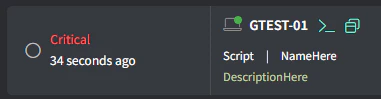 ([**Generate a test alert**](/generate-a-test-alert) if you do not see anything).
3. Click the **Dismiss** button on the far right:
([**Generate a test alert**](/generate-a-test-alert) if you do not see anything).
3. Click the **Dismiss** button on the far right:
 **Tips!**
Critical alerts can be subscribed to so they appear as native iOS/Android notifications on your mobile device. Navigate to your [**Profile Settings**](https://app.gorelo.io/application/setting) on the web and toggle on the Critical Alert subscription.
**Tips!**
Critical alerts can be subscribed to so they appear as native iOS/Android notifications on your mobile device. Navigate to your [**Profile Settings**](https://app.gorelo.io/application/setting) on the web and toggle on the Critical Alert subscription.