> ## Documentation Index
> Fetch the complete documentation index at: https://help.gorelo.io/llms.txt
> Use this file to discover all available pages before exploring further.
# Generate a form link
> Generate a one-time submission link for a Gorelo form to share with clients via email or directly from an existing ticket for self-service data capture.
1. Navigate to [**Forms**](https://app.gorelo.io/form/form-list) from the menu.
2. Select the form on the left.
3. Click the **Submission Link** button up the top right to copy the link.
**Tips!**
* Form links are one-time use and will expire after 7-days
* This form will generate a new ticket based on the [**Form Settings**](/forms-overview#form-settings)
## Generate a form link from an existing ticket
1. Create or navigate to an existing ticket.
2. Click **public comment** in the comment box.
 3. Type **Click here** and highlight the word **here**.
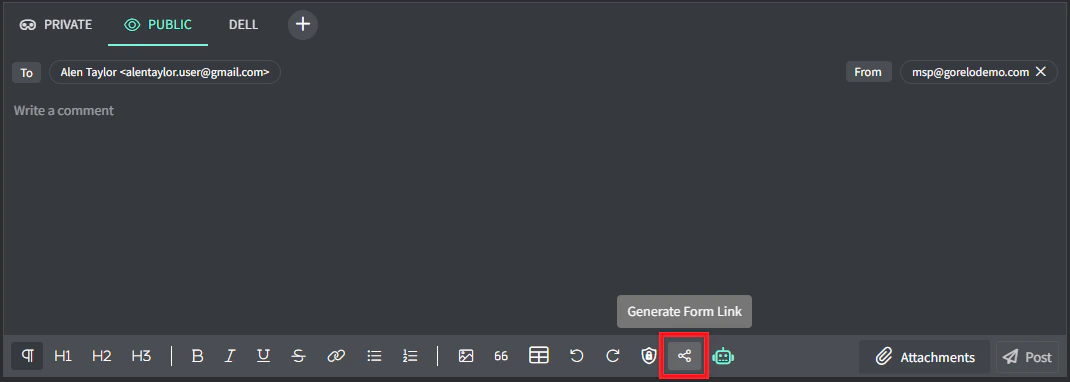
4. Click the **Generate form link** button.
3. Type **Click here** and highlight the word **here**.
4. Click the **Generate form link** button.
 5. Click the appropriate form to link.
**Tips!**
* Form links are one-time use and will expire after 7-days.
* This form will generate a submission on the existing ticket.
5. Click the appropriate form to link.
**Tips!**
* Form links are one-time use and will expire after 7-days.
* This form will generate a submission on the existing ticket.