> ## Documentation Index
> Fetch the complete documentation index at: https://help.gorelo.io/llms.txt
> Use this file to discover all available pages before exploring further.
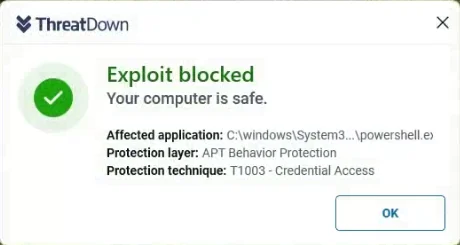
# Malwarebytes ThreatDown blocks Gorelo Connect
> Resolve Malwarebytes ThreatDown blocking the Gorelo Connect installation by adding the Gorelo program folder and shell executable as APT Behavior exclusions.
## Problem
You’re using Malwarebytes ThreatDown and the install of Gorelo Connect is blocked by APT Behavior Protection.
 ## Solution
Add the following exceptions:
```text theme={null}
C:\Program Files\Gorelo
```
```text theme={null}
C:\Program Files\Gorelo\Agent\Shell\Gorelo.RemoteManagement.Shell\Gorelo.RemoteManagement.Shell.exe
```
```text theme={null}
C:\Program Files\Gorelo\Agent\Plugins\*\*.dll
```
```text theme={null}
C:\Program Files\Gorelo\Agent\RMMAgent\Gorelo.RemoteManagement.Agent\Gorelo.RemoteManagement.Agent.exe
```
## Solution
Add the following exceptions:
```text theme={null}
C:\Program Files\Gorelo
```
```text theme={null}
C:\Program Files\Gorelo\Agent\Shell\Gorelo.RemoteManagement.Shell\Gorelo.RemoteManagement.Shell.exe
```
```text theme={null}
C:\Program Files\Gorelo\Agent\Plugins\*\*.dll
```
```text theme={null}
C:\Program Files\Gorelo\Agent\RMMAgent\Gorelo.RemoteManagement.Agent\Gorelo.RemoteManagement.Agent.exe
```