> ## Documentation Index
> Fetch the complete documentation index at: https://help.gorelo.io/llms.txt
> Use this file to discover all available pages before exploring further.
# 在同一工單上建立獨立的對話
> 在 Gorelo 使用 Third-Party Conversations 在同一工單上開啟另一條電子郵件對話串,讓供應商溝通井然有序而不會暴露客戶。
建立 Third-Party Conversation 以開啟新的電子郵件對話串,同時保留在同一張工單以保有上下文。例如:聯絡客戶的 LOB(line-of-business)應用程式支援,而不會遺失工單記錄。
這會建立一個新的對話串,獨立於 Public 對話串。在新的 Third Party Conversation 對話串中,你不會包含工單先前在 To/Cc 中的收件人。
## 建立 third-party conversation
1. 建立或前往現有的工單
2. 點擊 timeline 分頁中的 **+** 按鈕並新增一個 **Third Party Conversation**
3. 從現有聯絡人中搜尋或輸入名稱/電子郵件
* (可選)透過「Add more detail」下拉選單新增 Cc
* 可透過「Add more detail」下拉選單新增公開留言對話串
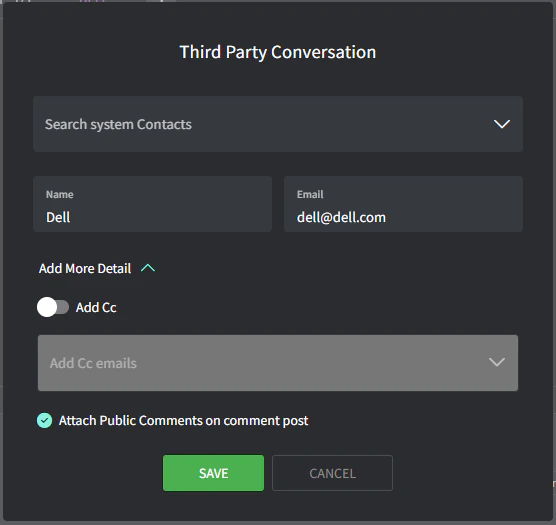 1. 點擊「**Save**」
2. 在展開的 **Third Party Conversation** 留言框中輸入你的電子郵件,並點擊「**Post**」(注意紫色的分頁顏色)
1. 點擊「**Save**」
2. 在展開的 **Third Party Conversation** 留言框中輸入你的電子郵件,並點擊「**Post**」(注意紫色的分頁顏色)
 ## 對話串可見性
對話串有不同的可見層級:
* **Private:** 僅有你與你的團隊在 Gorelo 管理介面中可見。
* **Public:** 你的聯絡人可透過電子郵件看到。
* **Thread:** 第三方可透過電子郵件看到。
## 對話串可見性
對話串有不同的可見層級:
* **Private:** 僅有你與你的團隊在 Gorelo 管理介面中可見。
* **Public:** 你的聯絡人可透過電子郵件看到。
* **Thread:** 第三方可透過電子郵件看到。