> ## Documentation Index
> Fetch the complete documentation index at: https://help.gorelo.io/llms.txt
> Use this file to discover all available pages before exploring further.
# 建立核准流程
> 在 Gorelo 中使用標記為核准者的 Contact Tag 設定核准流程,讓客戶可核准採購、存取請求與其他工單動作。
當你需要聯絡人核准某項事務時,例如購買新筆電或存取特定 SharePoint 網站,請使用核准功能。
若要將某位客戶端的聯絡人指定為核准者,請為他指派一個***已標記為核准者***的 Contact Tag。
## 建立 *Approver* 標籤
1. 前往 Settings > [**Tags**](https://app.gorelo.io/Admin/admin-settings#tagmanagementsettings) > Contact Tags。
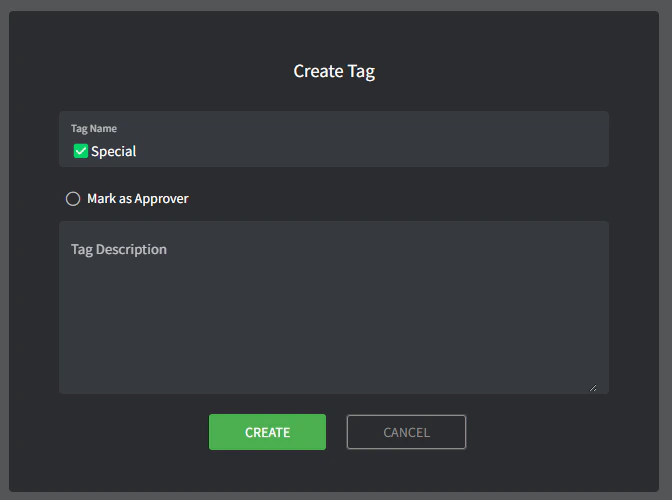
2. 建立一個 **Contact Tag**(在底部)。
* **Name**:這是標籤的名稱(例如「✅Special」)。
* **Mark as Approver**:這是你將其設定為核准者標籤的地方,勾選此方塊。
* **Description**:可在此更詳細描述標籤。此為內部使用,僅在此處可見。
 ## 將聯絡人指定為核准者
1. 前往 **[聯絡人清單](https://app-preview.gorelo.io/CRM/contact-list)**。
2. 點擊你想要指定為核准者的聯絡人。
3. 從 **Contact Tags** 下拉選單中,選擇剛才建立的「✅Special」標籤。
4. 在 **Description** 欄位中,描述他可以/不可以核准的任何額外事項(或留空),例如:*can only approve Engineering related requests.*
## 將聯絡人指定為核准者
1. 前往 **[聯絡人清單](https://app-preview.gorelo.io/CRM/contact-list)**。
2. 點擊你想要指定為核准者的聯絡人。
3. 從 **Contact Tags** 下拉選單中,選擇剛才建立的「✅Special」標籤。
4. 在 **Description** 欄位中,描述他可以/不可以核准的任何額外事項(或留空),例如:*can only approve Engineering related requests.*
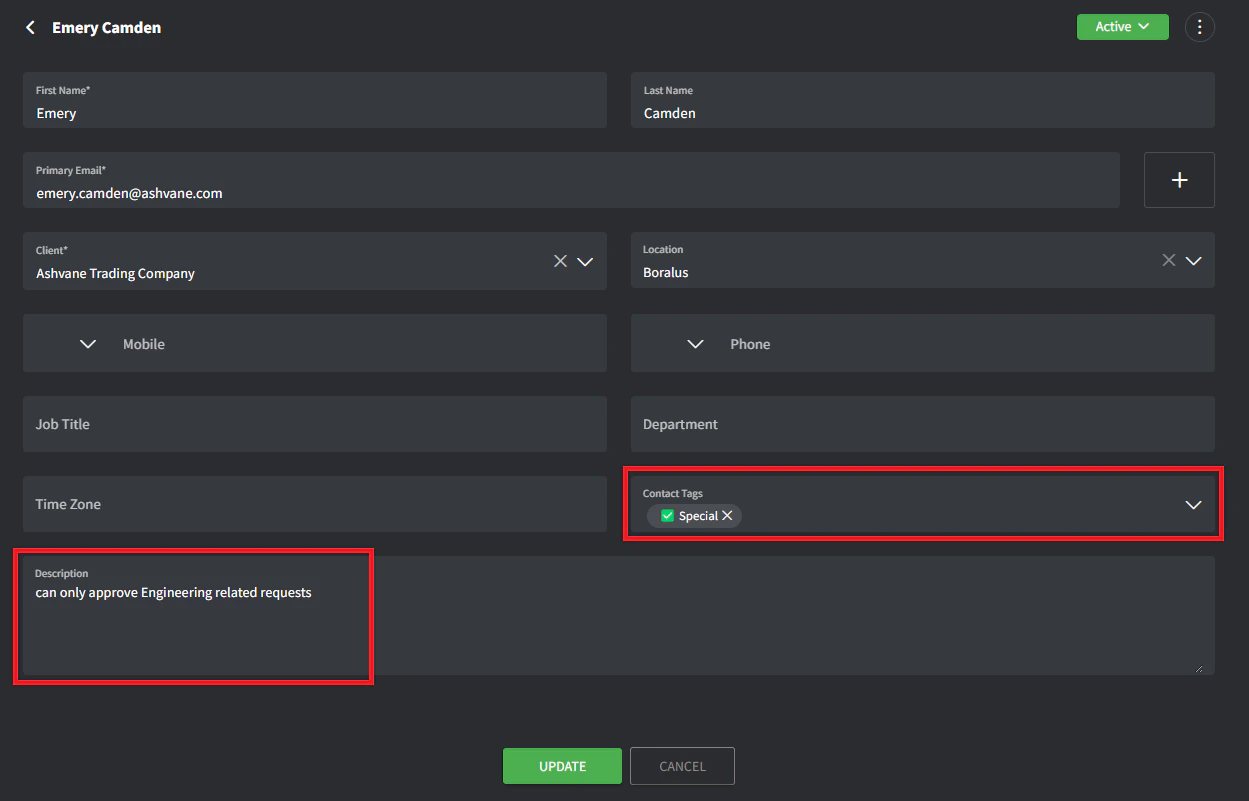 5. 點擊 **Update**。
## 啟動核准流程
1. 建立或前往現有工單(確保該客戶至少有一位聯絡人帶有 Approver 標籤)。
2. 點擊時間軸分頁中的 **+** 按鈕,並新增一個 **Approval**。
5. 點擊 **Update**。
## 啟動核准流程
1. 建立或前往現有工單(確保該客戶至少有一位聯絡人帶有 Approver 標籤)。
2. 點擊時間軸分頁中的 **+** 按鈕,並新增一個 **Approval**。
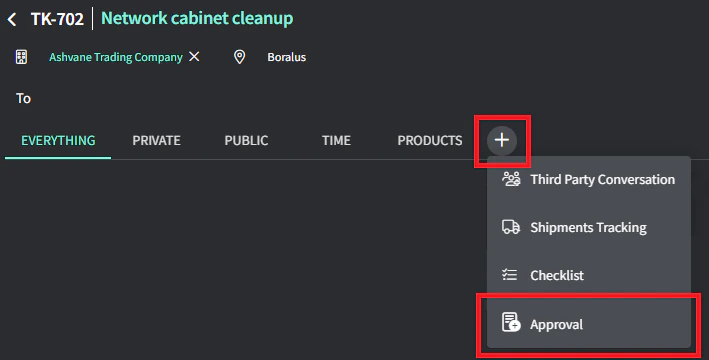 3. 選擇一個或多個你想要寄送郵件的聯絡人。
4. 輸入核准留言。
5. 點擊 **Submit** 寄出電子郵件。
所選聯絡人會收到一封郵件,內含你輸入的留言以及 **YES/NO** 按鈕可用來核准或拒絕該核准請求。
3. 選擇一個或多個你想要寄送郵件的聯絡人。
4. 輸入核准留言。
5. 點擊 **Submit** 寄出電子郵件。
所選聯絡人會收到一封郵件,內含你輸入的留言以及 **YES/NO** 按鈕可用來核准或拒絕該核准請求。