> ## Documentation Index
> Fetch the complete documentation index at: https://help.gorelo.io/llms.txt
> Use this file to discover all available pages before exploring further.
# 為工單建立到期規則
> 在 Gorelo 建立到期規則,當網域、保固或合約接近到期時產生警示,並支援多個閾值與客戶篩選。
你可以建立到期規則,在某些事項即將到期時發出警示:網域、保固與合約。
1. 前往 Settings —> Automation —> [**Expirations**](https://app.gorelo.io/admin/admin-settings#automation#expirations)
2. 點擊右上角的「**+Add Expiration**」
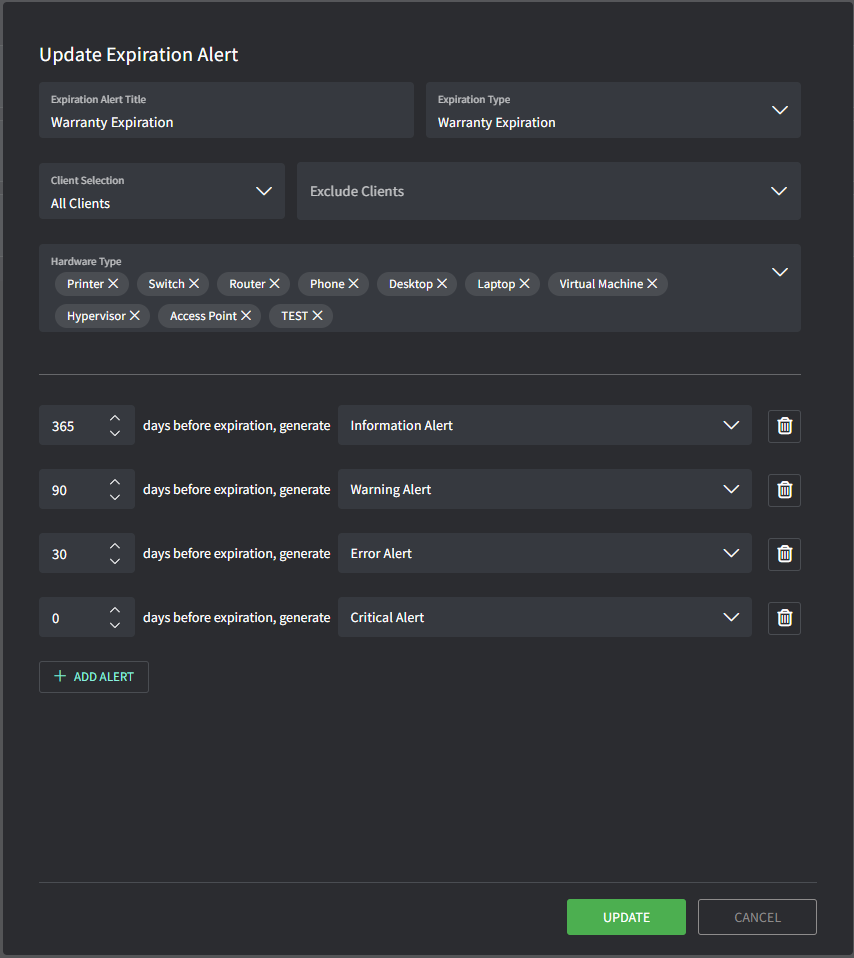
3. 輸入詳細資訊以設定到期規則:
* **Title**:這會是規則的名稱(不會出現在警示中)
* **Expiration Type**:決定規則套用於哪個日期欄位,例如
網域、保固與合約。
* **Client Selection**:可包含/排除規則套用的客戶
* **Hardware Type**:僅適用於 Warranty Expiration 類型,可依特定硬體類型篩選
* **Add Alert**:可依剩餘天數新增多個產生警示的閾值
 小提示!
* 警示會依組織的時區觸發\
(Settings → General → [**Organization**](https://app.gorelo.io/Admin/admin-settings#general#organization)→ Business Hours)
* 12:00 AM – Asset Warranty
* 1:00 AM – Domain Expiration
* 2:00 AM – Contract Expiration
小提示!
* 警示會依組織的時區觸發\
(Settings → General → [**Organization**](https://app.gorelo.io/Admin/admin-settings#general#organization)→ Business Hours)
* 12:00 AM – Asset Warranty
* 1:00 AM – Domain Expiration
* 2:00 AM – Contract Expiration