> ## Documentation Index
> Fetch the complete documentation index at: https://help.gorelo.io/llms.txt
> Use this file to discover all available pages before exploring further.
# 從警示建立工單
> 從 Alerts 清單將 Gorelo 警示轉換為工單,讓技術人員可調查問題、追蹤解決並計費相關的工作。
1. 從主選單前往 [**Alerts List**](https://app.gorelo.io/Alert/alerts)。
2. 在 Everything 檢視中,你應該會看到新產生的警示,其詳細資訊如下(但資產名稱不同):
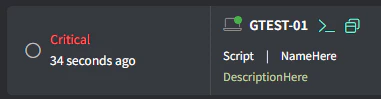 (若沒看到任何項目,可[**產生測試警示**](/generate-a-test-alert))。
3. 點擊最右側的 **Create Ticket** 按鈕:
(若沒看到任何項目,可[**產生測試警示**](/generate-a-test-alert))。
3. 點擊最右側的 **Create Ticket** 按鈕:
 4. 填入適當的詳細資訊並點擊 **Create**。