> ## Documentation Index
> Fetch the complete documentation index at: https://help.gorelo.io/llms.txt
> Use this file to discover all available pages before exploring further.
# 忽略警示
> 在 Gorelo 中忽略警示,從清單中清除特定發生與其堆疊,但不阻止未來警示;並包含關鍵警示行動訂閱的小提示。
忽略僅會清除該特定發生(與其堆疊),但不會阻止未來的發生繼續產生。
1. 從主選單前往 [**Alerts List**](https://app.gorelo.io/Alert/alerts)。
2. 在 Everything 檢視中,你應該會看到新產生的警示,其詳細資訊如下(但資產名稱不同):
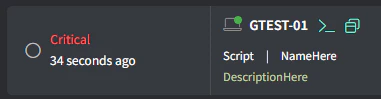 (若沒看到任何項目,可[**產生測試警示**](/generate-a-test-alert))。
3. 點擊最右側的 **Dimiss** 按鈕:
(若沒看到任何項目,可[**產生測試警示**](/generate-a-test-alert))。
3. 點擊最右側的 **Dimiss** 按鈕:
 **小提示!**
可訂閱 Critical 警示,讓它們在你的行動裝置上以原生 iOS/Android 通知顯示。在網頁上前往你的 [**Profile Settings**](https://app.gorelo.io/application/setting) 並開啟 Critical Alert 訂閱。
**小提示!**
可訂閱 Critical 警示,讓它們在你的行動裝置上以原生 iOS/Android 通知顯示。在網頁上前往你的 [**Profile Settings**](https://app.gorelo.io/application/setting) 並開啟 Critical Alert 訂閱。