> ## Documentation Index
> Fetch the complete documentation index at: https://help.gorelo.io/llms.txt
> Use this file to discover all available pages before exploring further.
# 過濾垃圾郵件
> 使用 Gorelo Spam 檢視在可疑郵件進入工單佇列前攔截它們,檢視寄件者、分數與收件者,然後解除標示或封鎖。
提供專屬的 Spam 檢視,可在可疑郵件進入工單佇列前進行管理。
可透過 [**Ticket List**](https://app.gorelo.io/Ticket/ticket-list) → Spam(位於「Create a View」按鈕上方)存取 **Spam** 檢視。
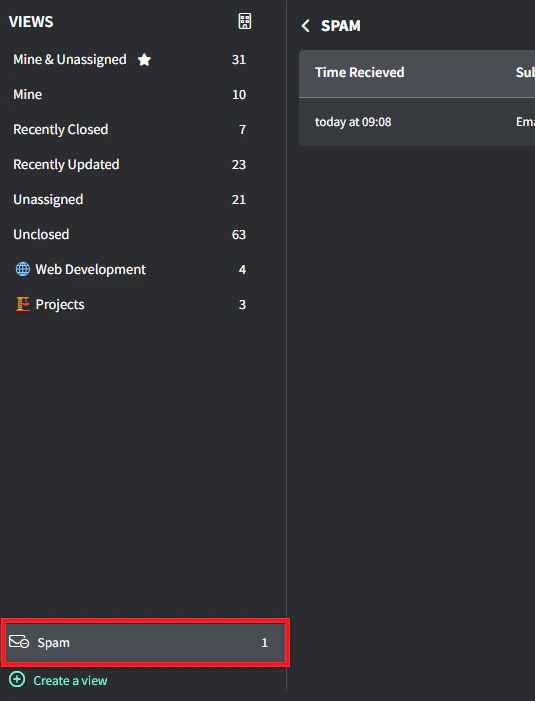 系統會攔截潛在的垃圾郵件並暫存以供審核,顯示:
* 收到時間
* 主旨
* 寄件者
* 垃圾郵件分數
* 收件者
系統會攔截潛在的垃圾郵件並暫存以供審核,顯示:
* 收到時間
* 主旨
* 寄件者
* 垃圾郵件分數
* 收件者
 每封被攔截的郵件提供兩個動作:
* **Create Ticket**:將合法郵件轉換為工單
* **Delete**:移除不想要的郵件(無法復原)
目前 Gorelo 的過濾閾值非常保守,以最小化誤判。隨著郵件量增加且模式浮現,保護等級會提升。
每封被攔截的郵件提供兩個動作:
* **Create Ticket**:將合法郵件轉換為工單
* **Delete**:移除不想要的郵件(無法復原)
目前 Gorelo 的過濾閾值非常保守,以最小化誤判。隨著郵件量增加且模式浮現,保護等級會提升。