> ## Documentation Index
> Fetch the complete documentation index at: https://help.gorelo.io/llms.txt
> Use this file to discover all available pages before exploring further.
# 什麼是表單
> Gorelo 中的表單可從終端使用者擷取硬體請求、使用者生命週期、客戶入職等資訊,並支援名稱與描述設定。
## 表單設定
### Name
變更表單的內部名稱:
1. 從選單前往 [**Forms**](https://app.gorelo.io/form/form-list)
2. 在左側選擇表單
3. 點擊現有表單名稱右側的編輯圖示
 4. 變更名稱並點擊「Update」
### Description
變更表單的內部描述:
1. 從選單前往 [**Forms**](https://app.gorelo.io/form/form-list)
2. 在左側選擇表單
3. 點擊描述欄位右側的編輯圖示
4. 變更名稱並點擊「Update」
### Description
變更表單的內部描述:
1. 從選單前往 [**Forms**](https://app.gorelo.io/form/form-list)
2. 在左側選擇表單
3. 點擊描述欄位右側的編輯圖示
 4. 新增/變更描述並點擊儲存圖示
### Groups
一個或多個 Groups 可自動加到透過表單建立的工單。你也可以選擇在工單建立時通知這些群組。
1. 從選單前往 [**Forms**](https://app.gorelo.io/form/form-list)
2. 在左側選擇表單
3. 選擇 **Settings** 分頁
4. 透過下拉選單選擇要自動套用的 Group
4. 新增/變更描述並點擊儲存圖示
### Groups
一個或多個 Groups 可自動加到透過表單建立的工單。你也可以選擇在工單建立時通知這些群組。
1. 從選單前往 [**Forms**](https://app.gorelo.io/form/form-list)
2. 在左側選擇表單
3. 選擇 **Settings** 分頁
4. 透過下拉選單選擇要自動套用的 Group
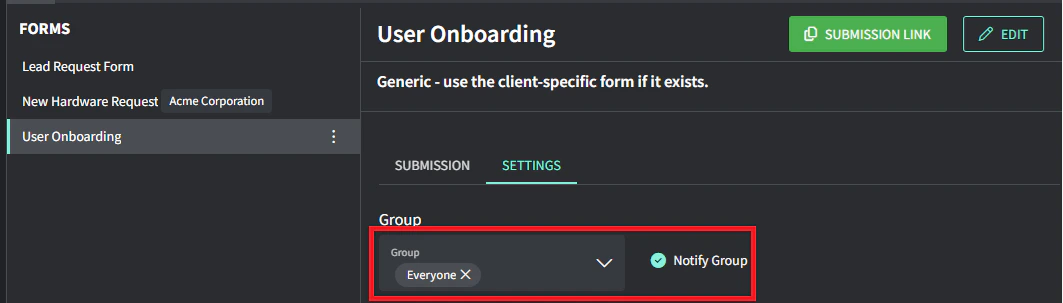 5. 開啟 **Notify group**,當有工單透過此表單建立時通知這些群組成員
6. 點擊底部的 **Save changes**
### Tags
一個或多個 Tags 可自動加到透過表單建立的工單。
1. 從選單前往 [**Forms**](https://app.gorelo.io/form/form-list)
2. 在左側選擇表單
3. 選擇 **Settings** 分頁
4. 透過下拉選單選擇要自動套用的標籤
5. 開啟 **Notify group**,當有工單透過此表單建立時通知這些群組成員
6. 點擊底部的 **Save changes**
### Tags
一個或多個 Tags 可自動加到透過表單建立的工單。
1. 從選單前往 [**Forms**](https://app.gorelo.io/form/form-list)
2. 在左側選擇表單
3. 選擇 **Settings** 分頁
4. 透過下拉選單選擇要自動套用的標籤
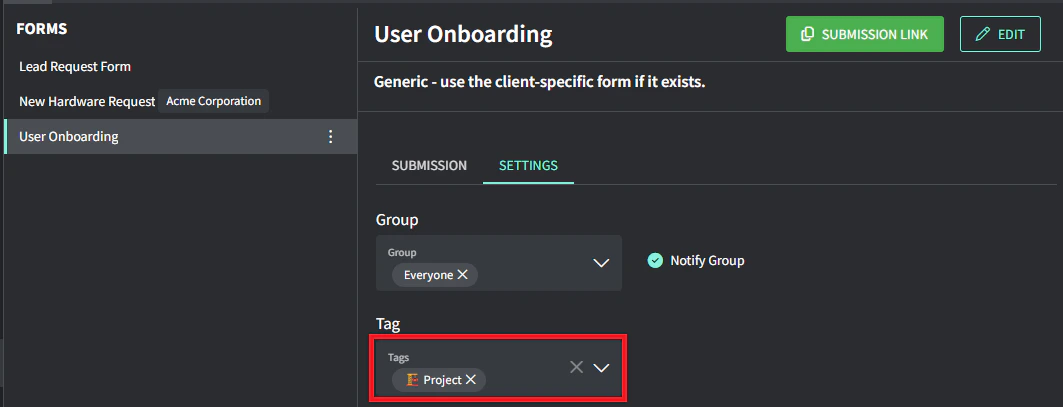 5. 點擊底部的 **Save changes**
### Clients
可設定表單只讓某些客戶能存取。這是從現有工單產生表單連結時減少雜亂的好方法。
1. 從選單前往 [**Forms**](https://app.gorelo.io/form/form-list)
2. 在左側選擇表單
3. 選擇 **Settings** 分頁
4. 透過下拉選單選擇要自動套用的標籤
5. 點擊底部的 **Save changes**
### Clients
可設定表單只讓某些客戶能存取。這是從現有工單產生表單連結時減少雜亂的好方法。
1. 從選單前往 [**Forms**](https://app.gorelo.io/form/form-list)
2. 在左側選擇表單
3. 選擇 **Settings** 分頁
4. 透過下拉選單選擇要自動套用的標籤
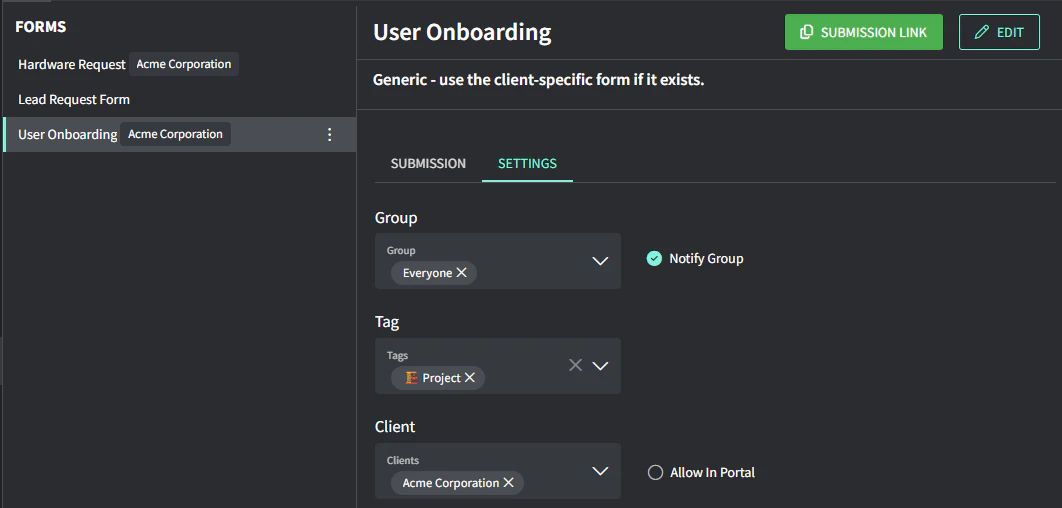 5. 點擊底部的 **Save changes**