> ## Documentation Index
> Fetch the complete documentation index at: https://help.gorelo.io/llms.txt
> Use this file to discover all available pages before exploring further.
# 用標籤群組資產
> 在 Gorelo 中使用內建與依應用程式、服務、登錄機碼或 Windows 功能驅動的自訂標籤群組資產,以鎖定政策並執行指令稿。
## 自訂標籤
1. 前往 Settings > [**Tags**](https://app.gorelo.io/Admin/admin-settings#tagmanagementsettings) > Asset Policy Tags。
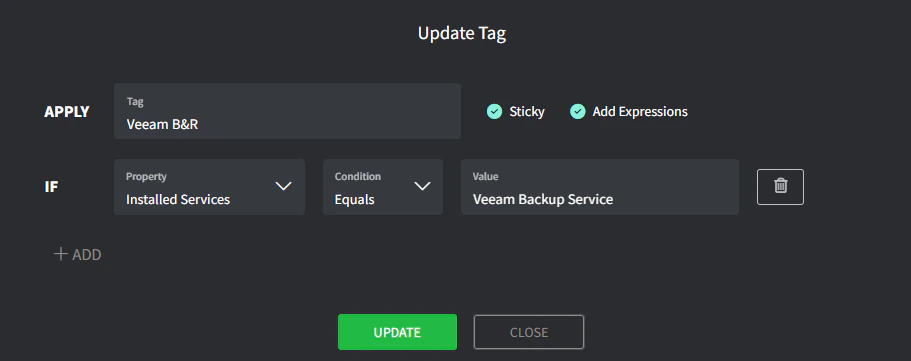
2. 建立 Asset Tag(在下方):
* **Tag**:標籤的名稱(例如 *Veeam B\&R*)。
* **Sticky**:標籤可被自動新增但不會被自動移除。
* **Property**:從 Apps、Services、Registry Key 與 Windows Features 中選擇。
* **Condition**:選擇適當的條件。
* **Value**:輸入預期的值。
 **標籤運算式** 大約每 6 小時評估一次,並在 [Gorelo.Rmm.Shell](http://Gorelo.Rmm.Shell) 服務啟動時(首次開機或手動)立即評估。
當你有附帶重要檢查(例如備份監控)的政策時應使用 **Sticky**。若有人不小心解除安裝 Veeam,標籤仍會保留,Veeam 備份檢查會繼續發出警示。\
當運算式不再符合時,可手動移除這些標籤。
**標籤運算式** 大約每 6 小時評估一次,並在 [Gorelo.Rmm.Shell](http://Gorelo.Rmm.Shell) 服務啟動時(首次開機或手動)立即評估。
當你有附帶重要檢查(例如備份監控)的政策時應使用 **Sticky**。若有人不小心解除安裝 Veeam,標籤仍會保留,Veeam 備份檢查會繼續發出警示。\
當運算式不再符合時,可手動移除這些標籤。