> ## Documentation Index
> Fetch the complete documentation index at: https://help.gorelo.io/llms.txt
> Use this file to discover all available pages before exploring further.
# 用 Dynamic Quantities 追蹤未計費項目
> 在 Gorelo 中使用 Dynamic Quantities 從資產標籤、聯絡人標籤與 Pax8 訂閱自動化合約計費,並呈現未計費的項目供你檢視。
Dynamic Quantities 用於透過增加/減少產品/套組的數量並建議尚未計費的項目,以自動化你的帳務。目前支援 **Asset Tags**、**Contact Tags**(M365)與 **Pax8** 訂閱。
## 設定規則
然後點擊右上角的 **Dynamic Quantities**。
你會看到 Gorelo 從每個 **Source** 偵測到的 **Dynamic Elements**。
範例:Source 為 **Asset Tag**,Dynamic Element 為 **Windows Workstation**。
 選擇當偵測到此動態元素(且目前未對應到合約)時應該發生的事。
* **Unmapped**:此元素會出現在 **Pending** 分頁中,並直接出現在每張合約上,等你對應產品/套組。
* **Suggest**:選擇要建議的產品/套組。此元素會出現在 **Pending** 分頁中,並直接出現在每張合約上,產品/套組已被建議,等你點擊「Add」。
* **Ignore**:此元素不會出現在 Pending 分頁或直接出現在每張合約上。
## 查看待處理項目
你應定期檢查 Pending 分頁以確保所有項目都已計費。出現在此處的任何項目都應被加到合約、個別忽略,或透過 Rules 分頁忽略。
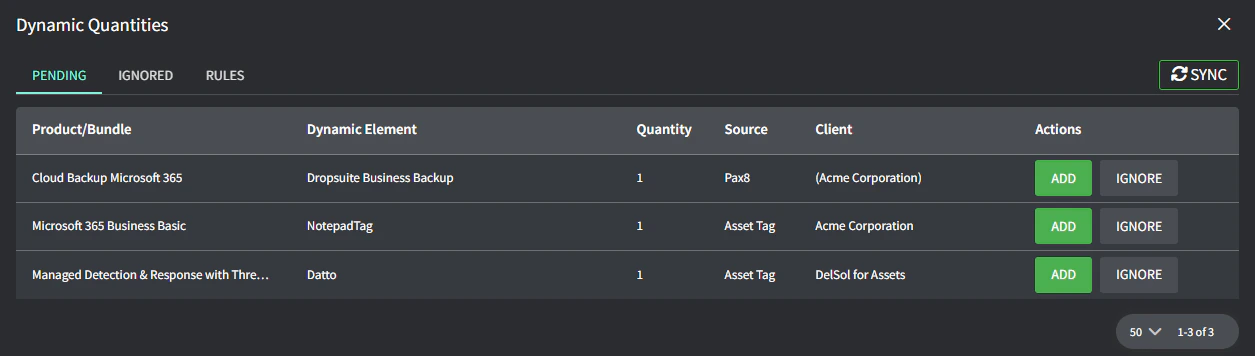
你會看到所有待新增到合約的動態元素:
* **Add** 會帶你到客戶的合約(或合約清單),讓你從那裡新增。
選擇當偵測到此動態元素(且目前未對應到合約)時應該發生的事。
* **Unmapped**:此元素會出現在 **Pending** 分頁中,並直接出現在每張合約上,等你對應產品/套組。
* **Suggest**:選擇要建議的產品/套組。此元素會出現在 **Pending** 分頁中,並直接出現在每張合約上,產品/套組已被建議,等你點擊「Add」。
* **Ignore**:此元素不會出現在 Pending 分頁或直接出現在每張合約上。
## 查看待處理項目
你應定期檢查 Pending 分頁以確保所有項目都已計費。出現在此處的任何項目都應被加到合約、個別忽略,或透過 Rules 分頁忽略。
你會看到所有待新增到合約的動態元素:
* **Add** 會帶你到客戶的合約(或合約清單),讓你從那裡新增。
 * **Ignore** 會僅對該特定客戶隱藏此特定動態元素(並出現在 Ignored 分頁中)
