> ## Documentation Index
> Fetch the complete documentation index at: https://help.gorelo.io/llms.txt
> Use this file to discover all available pages before exploring further.
# 在執行時使用變數
> 在 Gorelo 中將指令稿變數於設計時留空,使其在透過 CLI 隨選執行時提示輸入;適用於 Wake on LAN 與臨機 PowerShell 任務。
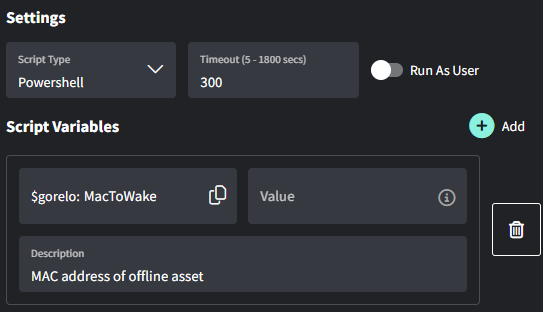
你可以將指令稿變數留空,並在透過 CLI 隨選執行時提示使用者。本範例將 WOL 封包傳送到執行時輸入的 MAC 位址。
1. 前往 **[Scripts](https://app.gorelo.io/Asset/script-list)。**
2. 建立指令稿,內容如下:
* **Name**:Wake on LAN
* **Content**:
```powershell theme={null}
$MacToWake = $gorelo:MacToWake
function Send-WoL {
[CmdletBinding()]
param(
[Parameter(Mandatory)]
[string]$MacAddress,
# Optional: force a specific interface by alias (e.g., "Wi-Fi")
[string]$InterfaceAlias
)
# --- Normalize & validate MAC ---
$norm = $MacAddress -replace '[:\-\. ]',''
if ($norm -notmatch '^[0-9A-Fa-f]{12}$') { throw "Invalid MAC after normalization: '$norm'." }
$macBytes = New-Object byte[] 6
for ($i = 0; $i -lt 12; $i += 2) { $macBytes[$i/2] = [Convert]::ToByte($norm.Substring($i,2),16) }
# --- Build magic packet ---
$packet = New-Object byte[] (6 + 16*6)
for ($i=0; $i -lt 6; $i++) { $packet[$i] = 0xFF }
for ($block=0; $block -lt 16; $block++) { [Array]::Copy($macBytes, 0, $packet, 6 + ($block*6), 6) }
# --- Pick active IPv4 from interface with best default route (0.0.0.0/0) ---
$route = Get-NetRoute -DestinationPrefix '0.0.0.0/0' -ErrorAction SilentlyContinue |
Sort-Object -Property RouteMetric, InterfaceMetric |
Select-Object -First 1
$ipRec = $null
if ($InterfaceAlias) {
$ipRec = Get-NetIPAddress -AddressFamily IPv4 -InterfaceAlias $InterfaceAlias -ErrorAction SilentlyContinue |
Where-Object { $_.IPAddress -notlike '169.254*' -and $_.IPAddress -ne '127.0.0.1' } |
Sort-Object -Property PrefixLength -Descending |
Select-Object -First 1
}
if (-not $ipRec -and $route) {
$ipRec = Get-NetIPAddress -AddressFamily IPv4 -InterfaceIndex $route.InterfaceIndex -ErrorAction SilentlyContinue |
Where-Object { $_.IPAddress -notlike '169.254*' -and $_.IPAddress -ne '127.0.0.1' } |
Select-Object -First 1
}
if (-not $ipRec) {
$ipRec = Get-NetIPAddress -AddressFamily IPv4 -ErrorAction SilentlyContinue |
Where-Object { $_.IPAddress -notlike '169.254*' -and $_.IPAddress -ne '127.0.0.1' } |
Select-Object -First 1
}
if (-not $ipRec) { throw "Couldn't detect a valid IPv4 address." }
$ipBytes = ([System.Net.IPAddress]::Parse($ipRec.IPAddress)).GetAddressBytes()
$prefix = [int]$ipRec.PrefixLength
# --- Build subnet mask bytes from prefix length (no Int32 conversion) ---
$maskBytes = 0,0,0,0
$bits = $prefix
for ($i=0; $i -lt 4; $i++) {
if ($bits -ge 8) { $maskBytes[$i] = 255; $bits -= 8 }
elseif ($bits -gt 0) {
$maskBytes[$i] = (0xFF - ( [math]::Pow(2, (8 - $bits)) - 1 )) -band 0xFF
$bits = 0
} else { $maskBytes[$i] = 0 }
}
# --- Compute broadcast: ip OR (NOT mask) (byte-wise) ---
$broadcastBytes = New-Object byte[] 4
for ($i=0; $i -lt 4; $i++) {
$invMask = (0xFF - $maskBytes[$i]) -band 0xFF
$broadcastBytes[$i] = ($ipBytes[$i] -bor $invMask) -band 0xFF
}
$broadcast = [System.Net.IPAddress]::new($broadcastBytes)
# --- Send to common WoL ports ---
foreach ($port in 9,7) {
$udp = New-Object System.Net.Sockets.UdpClient
$udp.EnableBroadcast = $true
$endpoint = New-Object System.Net.IPEndPoint $broadcast, $port
[void]$udp.Send($packet, $packet.Length, $endpoint)
$udp.Close()
Write-Host "Magic packet sent to $MacAddress via $($broadcast.ToString()):$port"
}
}
# Example:
# Send-WoL -MacAddress "98:FA:9B:55:B4:50"
# Or force a specific adapter:
# Send-WoL -MacAddress "98:FA:9B:55:B4:50" -InterfaceAlias "Wi-Fi"
# Example usage
Send-WoL -MacAddress $MacToWake
```
 將 MAC 位址寫入自訂欄位的指令稿請見[**本指南**](/install-via-custom-fields)。