

1
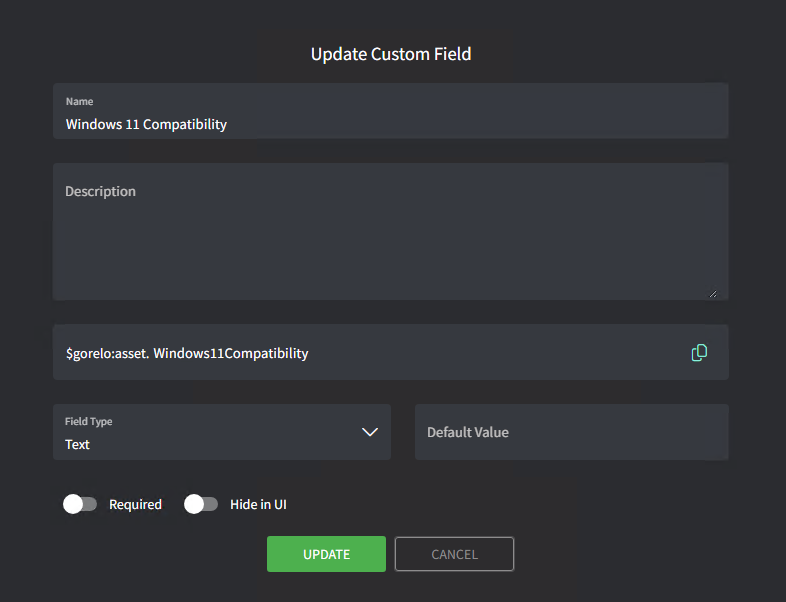
إنشاء حقل الأصل المخصص.
- انتقل إلى Settings > Assets > Custom Fields.
- أضف حقلًا مخصصًا بالتفاصيل التالية:
- Name: Windows 11 Compatibility
- Variable: Windows11Compatibility
2
إنشاء الوسم.
- انتقل إلى Settings > Tags.
- حدّد Asset Policy Tags من الأعلى.
- انقر على Create an Assets Tag في أسفل اليسار:
- Tag: Win11Compatible
- Property: Registry Key
- Condition: Equals
- Path: HKEY_LOCAL_MACHINE\SOFTWARE\Windows11Compatibility\Status
- Value: Compatible
- انقر على Save.
- انقر على Create an Assets Tag في أسفل اليسار:
- Tag: Win11NotCompatible
- Property: Registry Key
- Condition: Equals
- Path: HKEY_LOCAL_MACHINE\SOFTWARE\Windows11Compatibility\Status
- Value: NotCompatible
- انقر على Save.
- انقر على Create an Assets Tag في أسفل اليسار:
- Tag: Win11CheckFailed
- Property: Registry Key
- Condition: Equals
- Path: HKEY_LOCAL_MACHINE\SOFTWARE\Windows11Compatibility\Status
- Value: CheckFailed
- انقر على Save.
3
كتابة النص البرمجي
- انتقل إلى Scripts.
- أنشئ نصًا برمجيًا بالتفاصيل التالية:
- Name: Windows 11 Compatibility
- Content:
# Windows 11 Compatibility Check
# Adapted from Microsoft's HardwareReadiness.ps1

# Registry path and name
$RegistryPath = "HKLM:\SOFTWARE\Windows11Compatibility"
$RegistryName = "Status"

# Function to write to registry
function Write-Win11Registry {
    param(
        [string]$Status
    )

    try {
        # Create registry path if it doesn't exist
        if (!(Test-Path $RegistryPath)) {
            New-Item -Path $RegistryPath -Force | Out-Null
        }

        # Write the value
        New-ItemProperty -Path $RegistryPath -Name $RegistryName -Value $Status -PropertyType String -Force | Out-Null
    }
    catch {
        Write-Output "Failed to write to registry: $($_.Exception.Message)"
    }
}

$Source = @"
using Microsoft.Win32;
using System;
using System.Runtime.InteropServices;

    public class CpuFamilyResult
    {
        public bool IsValid { get; set; }
        public string Message { get; set; }
    }

    public class CpuFamily
    {
        [StructLayout(LayoutKind.Sequential)]
        public struct SYSTEM_INFO
        {
            public ushort ProcessorArchitecture;
            ushort Reserved;
            public uint PageSize;
            public IntPtr MinimumApplicationAddress;
            public IntPtr MaximumApplicationAddress;
            public IntPtr ActiveProcessorMask;
            public uint NumberOfProcessors;
            public uint ProcessorType;
            public uint AllocationGranularity;
            public ushort ProcessorLevel;
            public ushort ProcessorRevision;
        }

        [DllImport("kernel32.dll")]
        internal static extern void GetNativeSystemInfo(ref SYSTEM_INFO lpSystemInfo);

        public enum ProcessorFeature : uint
        {
            ARM_SUPPORTED_INSTRUCTIONS = 34
        }

        [DllImport("kernel32.dll")]
        [return: MarshalAs(UnmanagedType.Bool)]
        static extern bool IsProcessorFeaturePresent(ProcessorFeature processorFeature);

        private const ushort PROCESSOR_ARCHITECTURE_X86 = 0;
        private const ushort PROCESSOR_ARCHITECTURE_ARM64 = 12;
        private const ushort PROCESSOR_ARCHITECTURE_X64 = 9;

        private const string INTEL_MANUFACTURER = "GenuineIntel";
        private const string AMD_MANUFACTURER = "AuthenticAMD";
        private const string QUALCOMM_MANUFACTURER = "Qualcomm Technologies Inc";

        public static CpuFamilyResult Validate(string manufacturer, ushort processorArchitecture)
        {
            CpuFamilyResult cpuFamilyResult = new CpuFamilyResult();

            if (string.IsNullOrWhiteSpace(manufacturer))
            {
                cpuFamilyResult.IsValid = false;
                cpuFamilyResult.Message = "Manufacturer is null or empty";
                return cpuFamilyResult;
            }

            string registryPath = "HKEY_LOCAL_MACHINE\\Hardware\\Description\\System\\CentralProcessor\\0";
            SYSTEM_INFO sysInfo = new SYSTEM_INFO();
            GetNativeSystemInfo(ref sysInfo);

            switch (processorArchitecture)
            {
                case PROCESSOR_ARCHITECTURE_ARM64:
                    if (manufacturer.Equals(QUALCOMM_MANUFACTURER, StringComparison.OrdinalIgnoreCase))
                    {
                        bool isArmv81Supported = IsProcessorFeaturePresent(ProcessorFeature.ARM_SUPPORTED_INSTRUCTIONS);

                        if (!isArmv81Supported)
                        {
                            string registryName = "CP 4030";
                            long registryValue = (long)Registry.GetValue(registryPath, registryName, -1);
                            long atomicResult = (registryValue >> 20) & 0xF;

                            if (atomicResult >= 2)
                            {
                                isArmv81Supported = true;
                            }
                        }

                        cpuFamilyResult.IsValid = isArmv81Supported;
                        cpuFamilyResult.Message = isArmv81Supported ? "" : "Processor does not implement ARM v8.1 atomic instruction";
                    }
                    else
                    {
                        cpuFamilyResult.IsValid = false;
                        cpuFamilyResult.Message = "The processor isn't currently supported for Windows 11";
                    }
                    break;

                case PROCESSOR_ARCHITECTURE_X64:
                case PROCESSOR_ARCHITECTURE_X86:
                    int cpuFamily = sysInfo.ProcessorLevel;
                    int cpuModel = (sysInfo.ProcessorRevision >> 8) & 0xFF;
                    int cpuStepping = sysInfo.ProcessorRevision & 0xFF;

                    if (manufacturer.Equals(INTEL_MANUFACTURER, StringComparison.OrdinalIgnoreCase))
                    {
                        try
                        {
                            cpuFamilyResult.IsValid = true;
                            cpuFamilyResult.Message = "";

                            if (cpuFamily >= 6 && cpuModel <= 95 && !(cpuFamily == 6 && cpuModel == 85))
                            {
                                cpuFamilyResult.IsValid = false;
                                cpuFamilyResult.Message = "";
                            }
                            else if (cpuFamily == 6 && (cpuModel == 142 || cpuModel == 158) && cpuStepping == 9)
                            {
                                string registryName = "Platform Specific Field 1";
                                int registryValue = (int)Registry.GetValue(registryPath, registryName, -1);

                                if ((cpuModel == 142 && registryValue != 16) || (cpuModel == 158 && registryValue != 8))
                                {
                                    cpuFamilyResult.IsValid = false;
                                }
                                cpuFamilyResult.Message = "PlatformId " + registryValue;
                            }
                        }
                        catch (Exception ex)
                        {
                            cpuFamilyResult.IsValid = false;
                            cpuFamilyResult.Message = "Exception:" + ex.GetType().Name;
                        }
                    }
                    else if (manufacturer.Equals(AMD_MANUFACTURER, StringComparison.OrdinalIgnoreCase))
                    {
                        cpuFamilyResult.IsValid = true;
                        cpuFamilyResult.Message = "";

                        if (cpuFamily < 23 || (cpuFamily == 23 && (cpuModel == 1 || cpuModel == 17)))
                        {
                            cpuFamilyResult.IsValid = false;
                        }
                    }
                    else
                    {
                        cpuFamilyResult.IsValid = false;
                        cpuFamilyResult.Message = "Unsupported Manufacturer: " + manufacturer + ", Architecture: " + processorArchitecture + ", CPUFamily: " + sysInfo.ProcessorLevel + ", ProcessorRevision: " + sysInfo.ProcessorRevision;
                    }
                    break;

                default:
                    cpuFamilyResult.IsValid = false;
                    cpuFamilyResult.Message = "Unsupported CPU category. Manufacturer: " + manufacturer + ", Architecture: " + processorArchitecture + ", CPUFamily: " + sysInfo.ProcessorLevel + ", ProcessorRevision: " + sysInfo.ProcessorRevision;
                    break;
            }
            return cpuFamilyResult;
        }
    }
"@
try {
    $exitCode = 0

    [int]$MinOSDiskSizeGB = 64
    [int]$MinMemoryGB = 4
    [Uint32]$MinClockSpeedMHz = 1000
    [Uint32]$MinLogicalCores = 2
    [Uint16]$RequiredAddressWidth = 64

    # Initialize result object
    $outObject = @{
        returnCode = -2
        returnResult = "FAILED TO RUN"
        returnReason = ""
        logging = ""
    }

    # Check Storage
    $osDrive = Get-WmiObject -Class Win32_OperatingSystem | Select-Object -Property SystemDrive
    $osDriveSize = Get-WmiObject -Class Win32_LogicalDisk -filter "DeviceID='$($osDrive.SystemDrive)'" | Select-Object @{Name = "SizeGB"; Expression = { $_.Size / 1GB -as [int] } }

    if ($osDriveSize.SizeGB -lt $MinOSDiskSizeGB) {
        $outObject.returnReason += "Storage, "
    }

    # Check Memory
    $memory = Get-WmiObject Win32_PhysicalMemory | Measure-Object -Property Capacity -Sum | Select-Object @{Name = "SizeGB"; Expression = { $_.Sum / 1GB -as [int] } }

    if ($memory.SizeGB -lt $MinMemoryGB) {
        $outObject.returnReason += "Memory, "
    }

    # Check TPM
    $tpm = Get-Tpm
    if (!$tpm.TpmPresent) {
        $outObject.returnReason += "TPM, "
    }
    else {
        $tpmVersion = Get-WmiObject -Class Win32_Tpm -Namespace root\CIMV2\Security\MicrosoftTpm | Select-Object -Property SpecVersion
        if ($tpmVersion.SpecVersion) {
            $majorVersion = $tpmVersion.SpecVersion.Split(",")[0] -as [int]
            if ($majorVersion -lt 2) {
                $outObject.returnReason += "TPM Version, "
            }
        }
    }

    # Check CPU and add CPU Family check
    Add-Type -TypeDefinition $Source
    $cpuDetails = @(Get-WmiObject -Class Win32_Processor)[0]

    if ($null -eq $cpuDetails) {
        $outObject.returnReason += "Processor (Not Found), "
    }
    else {
        $processorCheckFailed = $false

        # AddressWidth
        if ($null -eq $cpuDetails.AddressWidth -or $cpuDetails.AddressWidth -ne $RequiredAddressWidth) {
            $processorCheckFailed = $true
        }

        # ClockSpeed is in MHz
        if ($null -eq $cpuDetails.MaxClockSpeed -or $cpuDetails.MaxClockSpeed -le $MinClockSpeedMHz) {
            $processorCheckFailed = $true
        }

        # Number of Logical Cores
        if ($null -eq $cpuDetails.NumberOfLogicalProcessors -or $cpuDetails.NumberOfLogicalProcessors -lt $MinLogicalCores) {
            $processorCheckFailed = $true
        }

        # CPU Family
        $cpuFamilyResult = [CpuFamily]::Validate([String]$cpuDetails.Manufacturer, [uint16]$cpuDetails.Architecture)
        if (!$cpuFamilyResult.IsValid) {
            $processorCheckFailed = $true
        }

        if ($processorCheckFailed) {
            $outObject.returnReason += "Processor, "
        }
    }

    # Check SecureBoot
    try {
        $null = Confirm-SecureBootUEFI
    }
    catch {
        $outObject.returnReason += "SecureBoot, "
    }

    # Check for i7-7820hq exception
    try {
        $supportedDevices = @('surface studio 2', 'precision 5520')
        $systemInfo = @(Get-WmiObject -Class Win32_ComputerSystem)[0]

        if ($cpuDetails.Name -match 'i7-7820hq cpu @ 2.90ghz') {
            $modelOrSKUCheckLog = $systemInfo.Model.Trim()
            if ($supportedDevices -contains $modelOrSKUCheckLog) {
                $outObject.returnReason = ""  # Clear any CPU-related failures
            }
        }
    }
    catch {
        # Ignore i7 exception check failures
    }

    # Set final result
    $WIN11COMPATIBLE = $outObject.returnReason.Length -eq 0

    # Output result to object
    $outputObject = [pscustomobject]@{
        WIN11COMPATIBLE = $WIN11COMPATIBLE
        IncompatibleItems = $outObject.returnReason.TrimEnd(", ")
    }

    # Write to Gorelo custom field
    $result = if ($WIN11COMPATIBLE) { "Compatible" } else { "Not Compatible: $($outObject.returnReason.TrimEnd(', '))" }
    GoreloAction -SetCustomField -Name 'asset.Windows11Compatibility' -Value $result

    # Write to Registry
    if ($WIN11COMPATIBLE) {
        Write-Win11Registry -Status "Compatible"
    }
    else {
        Write-Win11Registry -Status "NotCompatible"
    }

    # Return the output object
    $outputObject
}
catch {
    # Create error output object
    $outputObject = [pscustomobject]@{
        WIN11COMPATIBLE = $false
        IncompatibleItems = "Error running compatibility check: $($_.Exception.Message)"
    }

    # Write error to Gorelo custom field
    GoreloAction -SetCustomField -Name 'asset.Windows11Compatibility' -Value "Error running check: $($_.Exception.Message)"

    # Write error to Registry
    Write-Win11Registry -Status "CheckFailed"

    # Return the error output object
    $outputObject
}
4
نشر النص البرمجي عبر سياسة.
- انتقل إلى Policies.
- عدّل سياسة موجودة تغطي الأصول التي تريد التحقق من توافقها مع Windows 11.
- أضف نص Windows 11 Compatibility البرمجي وعيّنه ليتكرر يوميًا في الوقت المفضل لديك.
- احفظ و وزّع السياسة.
5
إنشاء View في قائمة Assets.
- انتقل إلى Assets.
- انقر على Create view في أسفل اليسار واستخدم التفاصيل التالية:
- Title: Win11 Compatible
- Tags: Win11Compatible
- انقر على Save.
- افعل الشيء نفسه لـ Win11 NotCompatible و Win11 CheckFailed.