Saltar al contingut principal
Seguiu aquesta guia per integrar altres eines a Gorelo, com Splashtop, AnyDesk, TeamViewer, etc. Podeu integrar Gorelo amb qualsevol eina d’accés remot que admeti el llançament via un URL, com Splashtop, AnyDesk o TeamViewer. Aquest exemple utilitza:
  • Splashtop Business
  • RustDesk
  • Webroot
1

Creeu el camp personalitzat d'actiu.

  1. Aneu a Configuració > Actius > Camps personalitzats.
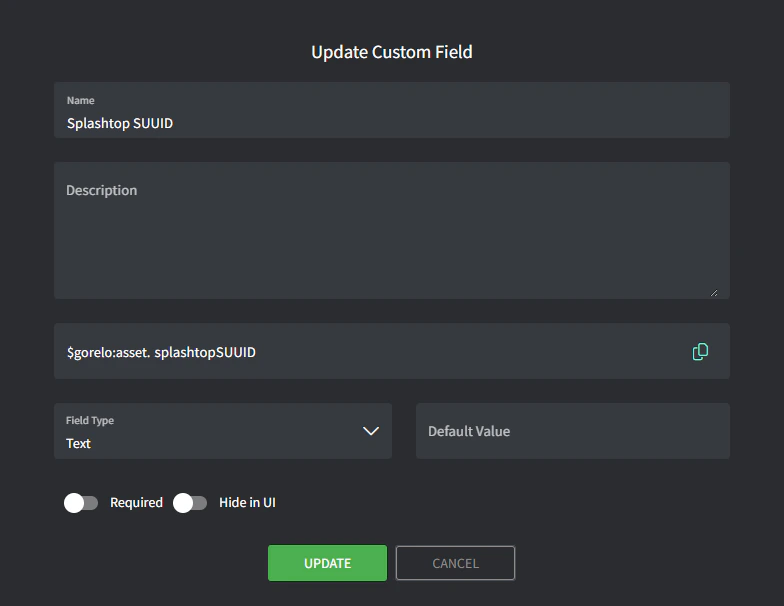
  2. Afegiu un camp personalitzat amb els detalls següents:
    • Nom: Splashtop SUUID
    • Variable: splashtopSUUID
Image
2

Escriviu l'script.

  1. Aneu a Scripts.
  2. Creeu un script amb els detalls següents:
    • Nom: Store-SplashtopSUUID
    • Contingut:
# Define registry path for 64-bit machines
$regPath64 = "HKLM:\SOFTWARE\WOW6432Node\Splashtop Inc.\Splashtop Remote Server"

# Define the value name for the SUUID
$regValue = "SUUID"

# Try to retrieve the SUUID from the 64-bit registry
if (Test-Path $regPath64) {
    try {
        $suuid = Get-ItemProperty -Path $regPath64 -Name $regValue -ErrorAction Stop
        
        # Check if the SUUID value is present
        if ($suuid.$regValue) {
            $suuidValue = $suuid.$regValue
            Write-Output "Splashtop SUUID: $suuidValue"
            
            # Write the SUUID to the Gorelo custom field
            GoreloAction -SetCustomField -Name 'asset.splashtopSUUID' -Value $suuidValue
        } else {
            Write-Output "SUUID not found in the registry."
        }
    } catch {
        Write-Output "Error retrieving SUUID from the registry: $_"
    }
} else {
    Write-Output "Splashtop registry not found."
}
3

Desplegueu l'script via una política.

  1. Aneu a Polítiques.
  2. Editeu una política existent que cobreixi els actius per als quals voleu emmagatzemar el Splashtop SUUID.
  3. Afegiu l’script Store-SplashtopSUUID i configureu-lo perquè es repeteixi diàriament a l’hora preferida.
  4. Deseu i distribuïu la política.
4

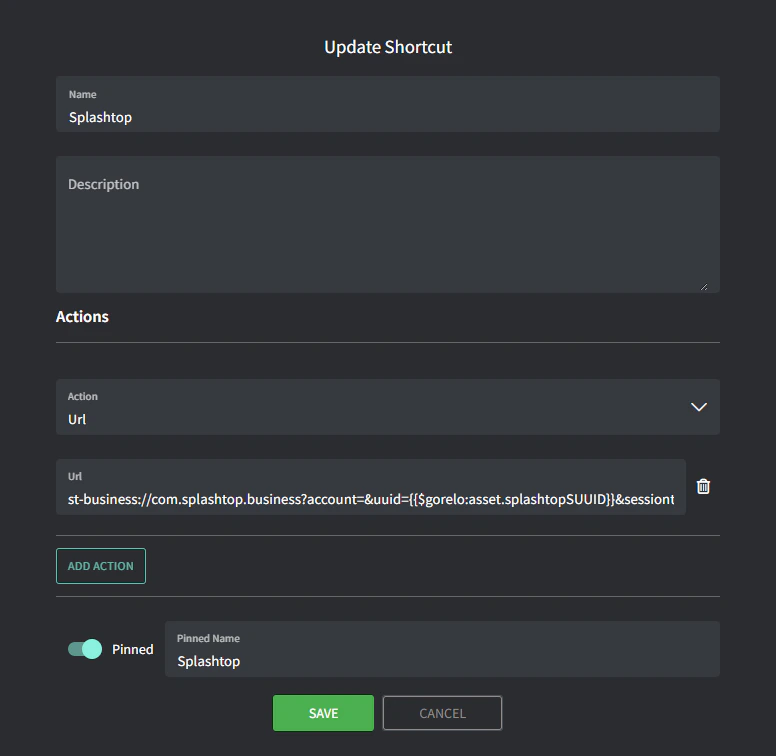
Creeu la drecera.

  1. Aneu a Dreceres d’actiu.
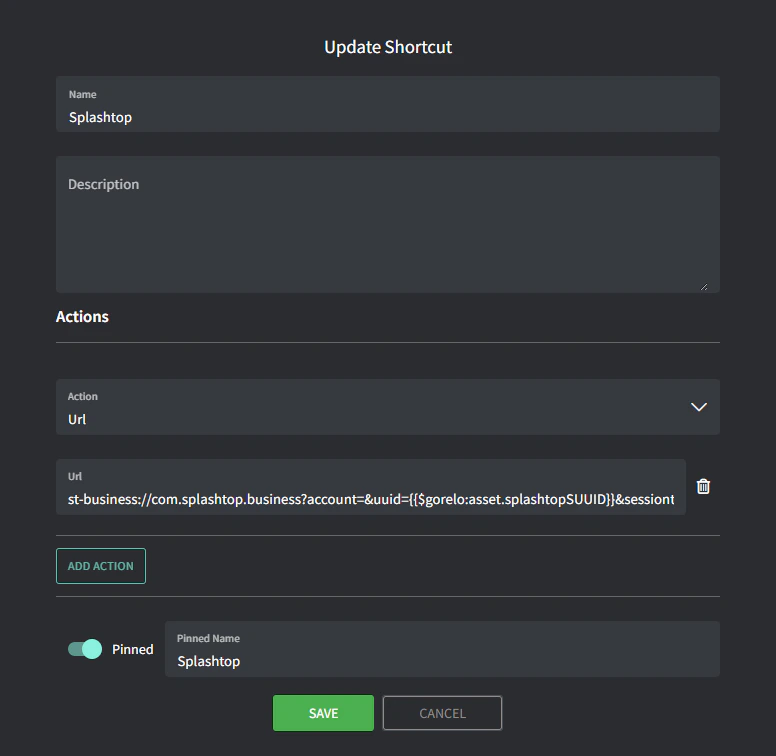
  2. Afegiu una nova drecera amb els detalls següents:
    • Nom: Splashtop
    • URL: t-business://com.splashtop.business?account=&uuid={{$gorelo:asset.splashtopSUUID}}&sessiontype=remote
    • Nom fixat: Splashtop
      Image 94
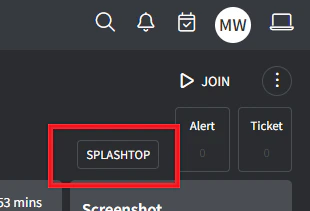
      Ara hauríeu de veure la drecera SPLASHTOP a l’extrem superior dret de la pàgina de detall de l’actiu. Si l’script ha emplenat correctament la variable $gorelo:asset.splashtopSUUID, aquesta drecera llançarà l’aplicació Splashtop Business.
      Image
La drecera no instal·la Splashtop: caldria utilitzar un altre script per a això, per exemple:
# Installs Splashtop Streamer using the installer MSI uploaded to $gorelo:file.splashtopInstaller
# Runs a silent install using the 12-digit deployment key at $gorelo:client.splashtopKey

#Check for presence of SplashtopKey
if ([string]::IsNullOrEmpty($gorelo:client.splashtopKey)) {
Write-Output "No SplashTop Key stored for this client. Automatic installation cancelled."
GoreloAction -Alert -Severity 3 -Name "No Splashtop Key stored for this client" -Description "No Splashtop Key is stored in the client custom field so the automatic installation has been cancelled" -Suppress 0
} else {
Write-Output "Splashtop Key Found: " $gorelo:client.splashtopKey
Write-Output "Installer Path: " $gorelo:file.splashtopInstaller
}

#Install Splashtop
msiexec /i $gorelo:file.splashtopInstaller USERINFO="dcode=$gorelo:client.splashtopKey,hidewindow=1,confirm_d=0" /qn /norestart