

https://1password.com/product/enterprise-password-manager-msp-edition
1
导航到 Settings > Integrations
2
点击 ⚙️ 齿轮图标以配置 1Password。
3
填写必填字段:
Service Account Token:
- 导航到你的 1Password 管理控制台 > Developer > Service accounts。
- 点击右上角的 New service account。
- 输入
Gorelo作为名称。 - 选择你的保管库并授予写入权限。
- 创建账户并将服务账户令牌复制到 Gorelo。
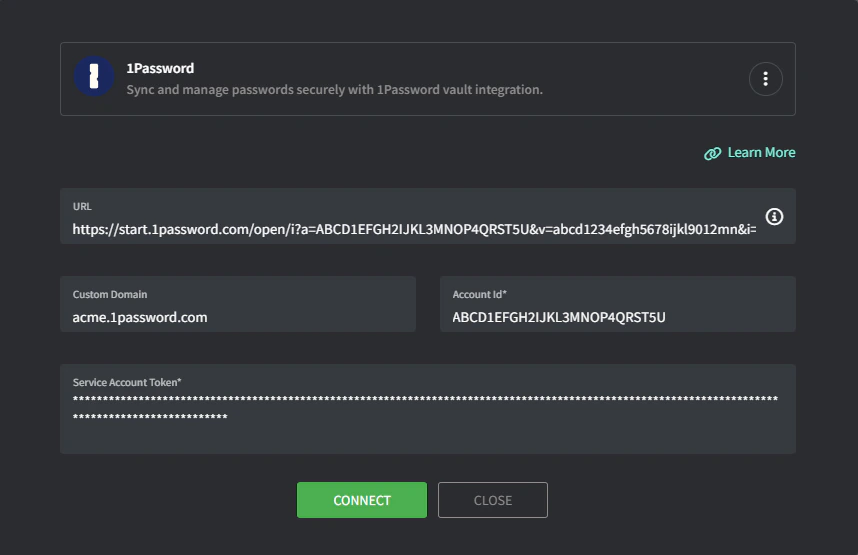
4
点击 Connect,然后 Group。
会出现保管库映射屏幕。
5
将 Gorelo 组映射到适当的 1Password 保管库。
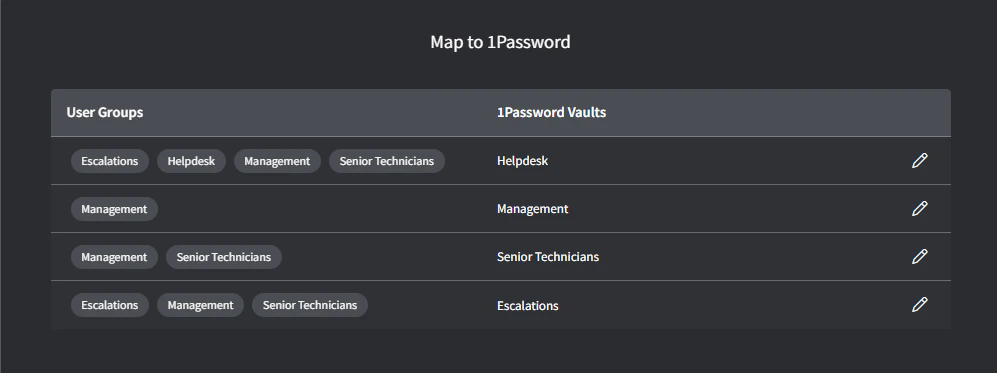
6
完成后点击 Map。
故障排除
1Password 集成在尝试同步时显示 'read only' 权限。
1Password 集成在尝试同步时显示 'read only' 权限。
你的集成可能缺少写入权限(步骤 3)。要更改保管库/权限,1Password 要求你删除服务账户并重新创建它。在添加服务账户令牌时,请确保添加写入权限。