

1
從選單前往 Policies
選擇現有政策。
2
選擇 Plugin 選項
將滑鼠移到右上角的 Add 按鈕並選擇 Plugin。
3
從清單選擇 GoreloConnect
- Require consent before connecting:使用者必須先核准連線,你才能連線。
- Auto-consent after x seconds:Gorelo 會在設定的時間後自動給予同意,例如使用者離開座位時。
切換 Show connection in progress banner 選項以提醒使用者你正在連線到他們的電腦。啟用後,每當你啟動遠端連線時,受控電腦上會出現橫幅,顯示訊息「<technician name> from <organization name> is controlling your computer.」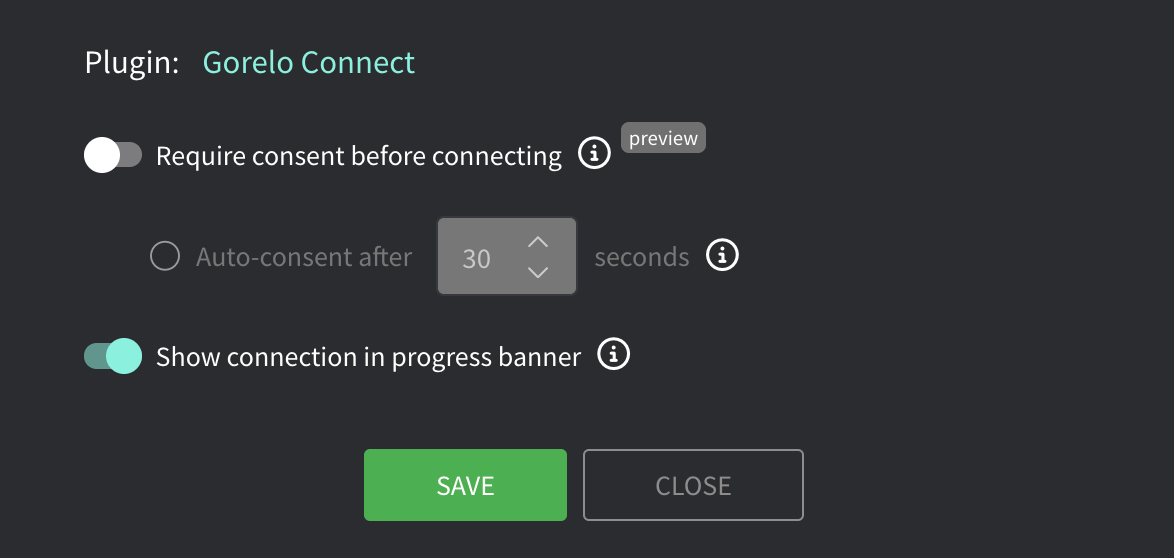
4
點擊 Save
5
分發政策
試用 Gorelo Connect v2
Alpha Gorelo Connect v2 從你的瀏覽器啟動工作階段,因此你不需要在自己的電腦上安裝任何東西。它支援:- Windows 與 macOS 資產。
- 在工作階段期間封鎖終端使用者的鍵盤與滑鼠。
- 技術人員與終端使用者之間的剪貼簿同步。
- 在工作階段結束後鎖定終端使用者的裝置。
- 在多螢幕的 Windows 與 Mac 電腦上,將任一遠端螢幕彈出至獨立視窗。
- 在 macOS 上畫面靜止時提供更清晰的影像。
- 從 Quick Connect 啟動的工作階段。
- 直接(P2P)連線。在 macOS 15 及更新版本上,終端使用者會看到一次性的 Local Network 提示,要求允許此連線。
- 使用 Ctrl+V 或 ⌘V 將檔案貼上到工作階段中。
- 從遠端裝置複製影像。
- Translate 鍵盤模式:即使遠端裝置設定為不同的鍵盤配置,你自己的鍵盤配置也能正確輸入(Ctrl+C 等快捷鍵仍照常運作)。
- 在 Windows 上於工作階段中途變更解析度。
- 在 Windows 與 macOS 上使用 AV1 視訊編解碼器,在相同位元率下提供更清晰的畫面。如果裝置或檢視者無法使用 AV1,工作階段會維持使用 H.264。你也可以在外掛中將 AV1 設為預設編解碼器。
- 在全螢幕模式下,將 Windows 鍵、Win+R 與 Alt+Tab 等快捷鍵傳送到遠端裝置,而非你自己的電腦。此功能僅適用於 Chrome 與 Edge。按住 Esc 2 秒即可退出全螢幕。
- 用於傳送特殊按鍵與快捷鍵的 Send keys 列。
開啟 Connect v2
1
選擇政策
在 Policies 中,選擇一個政策並點擊鉛筆圖示進行編輯。
2
開啟 Connect v2
切換 Use Gorelo Connect v2。
對於 macOS 資產,你也可以啟用在安裝期間請求權限的選項。終端使用者必須在安裝期間允許 Gorelo Connect 的權限。如果你保持關閉,終端使用者必須在技術人員第一次連線時允許權限。
3
儲存並分發政策
部署不會立即完成。一旦 Connect v2 在資產上啟用,其連線按鈕會顯示 Connect (v2)。
Send keys 列
Send keys 列可將按鍵與快捷鍵傳送到遠端裝置。它適用於任何瀏覽器以及 Gorelo Mobile。若要開啟它,請在工作階段中開啟 ⋯ 選單。 此列包含:- 黏滯的 Ctrl、Alt、Shift 與 Win 鍵。
- Esc、Tab、Del 與 PrtScn。
- F1 至 F12。
- 快捷鍵選擇器。
Connect v2 疑難排解
我已開啟 Connect v2,但資產仍顯示 v1 按鈕
我已開啟 Connect v2,但資產仍顯示 v1 按鈕
分發需要時間。請檢查個別資產上的政策,確認其中已啟用 Connect v2,然後等待資產套用變更。
Mac 工作階段非常緩慢,每秒只有幾個畫面
Mac 工作階段非常緩慢,每秒只有幾個畫面
該 Mac 上的 Connect v2 可能缺少螢幕錄製權限。請終端使用者在 System Settings > Privacy & Security > Screen & System Audio Recording 中開啟存取權。
從手機連線時鍵盤沒有開啟
從手機連線時鍵盤沒有開啟
Connect v2 並未針對行動瀏覽器最佳化。若要從手機控制資產,請使用 Gorelo Mobile。