

https://1password.com/product/enterprise-password-manager-msp-edition
1
前往 Settings > Integrations
2
點擊 ⚙️ 齒輪圖示以設定 1Password。
3
填入必填欄位:
Service Account Token:
- 前往你的 1Password 管理員主控台 > Developer > Service accounts。
- 點擊右上角的 New service account。
- 輸入
Gorelo作為名稱。 - 選擇你的保管庫並給予寫入權限。
- 建立帳戶並將 service account token 複製到 Gorelo。
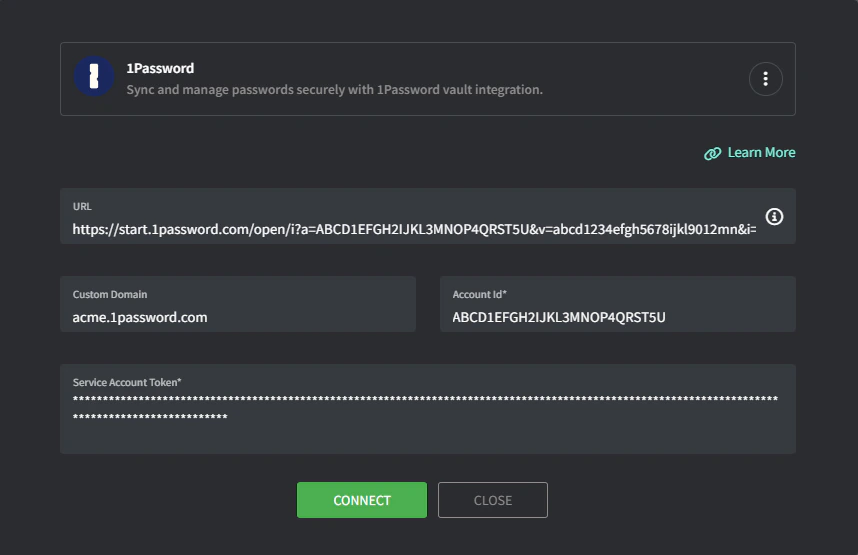
4
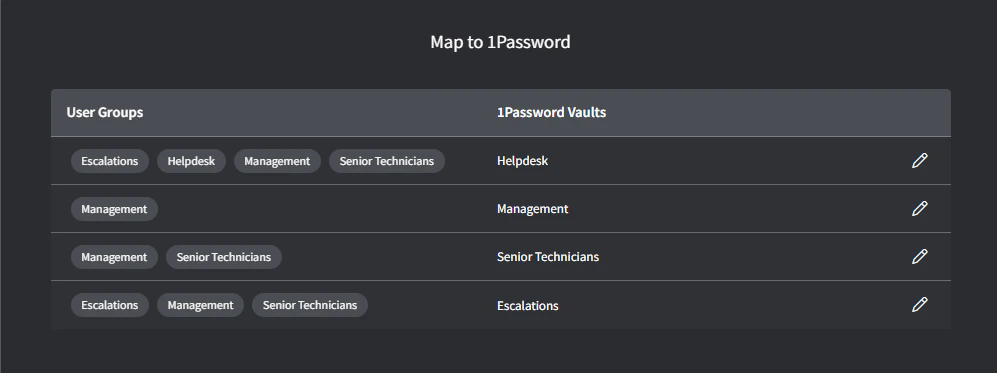
點擊 Connect,Group 對應畫面會出現。
Vault mapping 畫面會出現。
5
將 Gorelo Groups 對應到適當的 1Password Vaults。
6
完成時點擊 Map。
疑難排解
嘗試同步時,1Password 整合顯示『read only』權限。
嘗試同步時,1Password 整合顯示『read only』權限。
你的整合可能缺少寫入權限(步驟 3)。要變更保管庫/權限,1Password 要求你刪除並重新建立 service account。在新增 Service Account Token 時務必加入寫入權限。