

1
Navigate to Settings > Integrations.
2
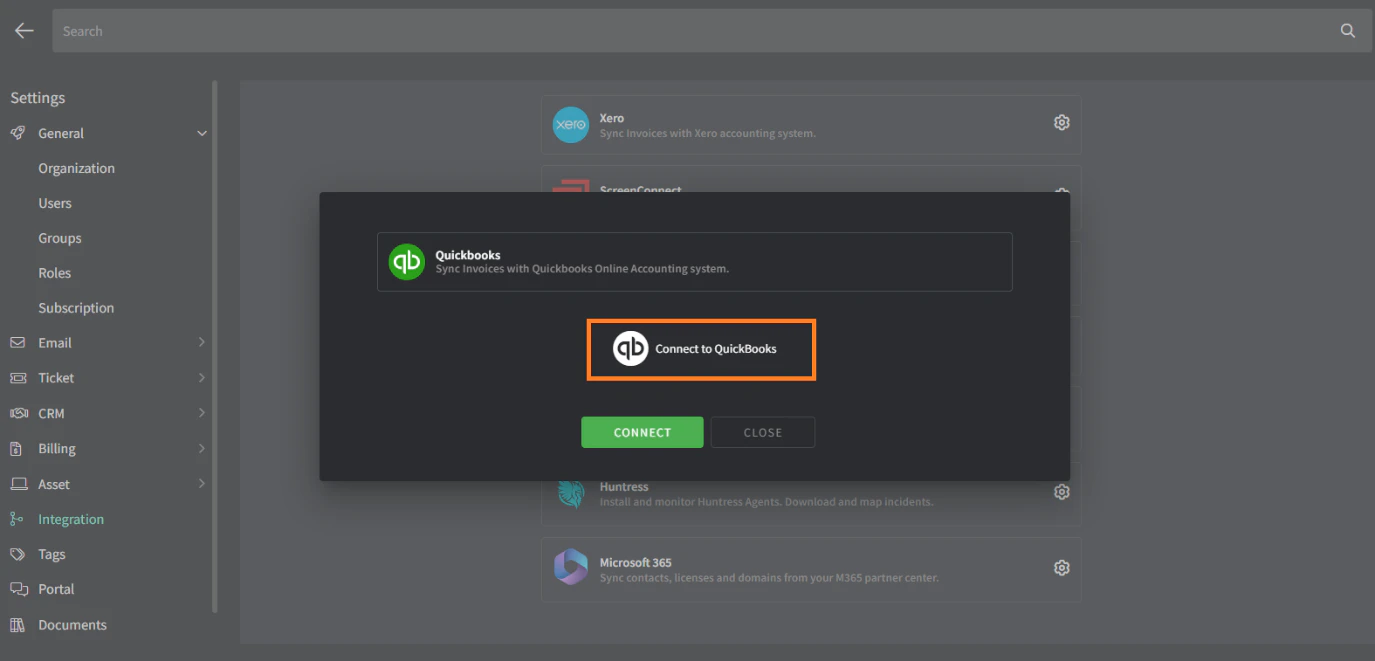
Click the ⚙️cog icon to configure QuickBooks.
3
Click the Connect to QuickBooks button.
4
Log in with your QuickBooks account and allow access.
You will then be redirected back to Gorelo with a success message.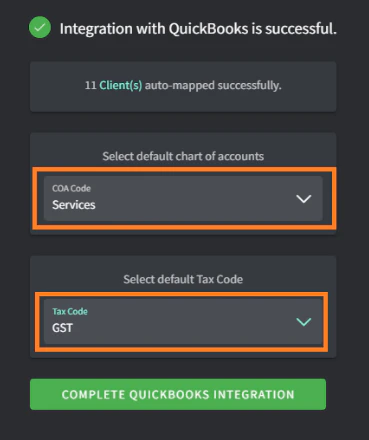
5
Select a default Chart of Account (COA) code from the list.
This will be used for any item synced from Gorelo to QuickBooks that does not have a COA code applied automatically to the product/bundle/category.
Gorelo recommends creating a new COA code such as ‘4444 Uncoded from Gorelo’ to make it obvious when something synced without a legitimate COA code. If this code has just been created, then F5 refreshes while on the ‘Integration with QuickBooks is successful’ screen so it appears, or start the integration again.
6
Select a default Tax Code from the list.
7
Click the Complete QuickBooks Integration button.
Optional settings
- Set default tax rate
1
Navigate to Settings > Billing > Invoice Settings.
2
Click the Sync button in the top right corner to resync.
3
Set your default tax rate.
Clicking the Mark as default button on the far right of your chosen tax rate.