Gorelo Documentation home page
Search...
⌘K
Overview
Operations
Tickets
Alerts
Knowledge
Documents
Forms
What are forms
Create a form
Generate a form link
Publish a form
Passwords
CRM
Clients
Contacts
Senders
How-to guides
Get a sentiment analysis from a ticket
Automate tags on tickets
Automatically assign a ticket type
Schedule tickets creation
Automatically solve and close
Create an expiration rule for tickets
Automatically assign a ticket based on events and time
Generate and rephrase replies
Changelog
Dashboard
Gorelo Documentation home page
Search...
⌘K
Ask AI
Changelog
Dashboard
Dashboard
Search...
Navigation
Forms
Publish a form
Get Started
Service Delivery
Remote Management
Billing
Integrations
API
Get Started
Service Delivery
Remote Management
Billing
Integrations
API
Forms
Publish a form
Copy page
Publish a form to the Client Portal.
Copy page
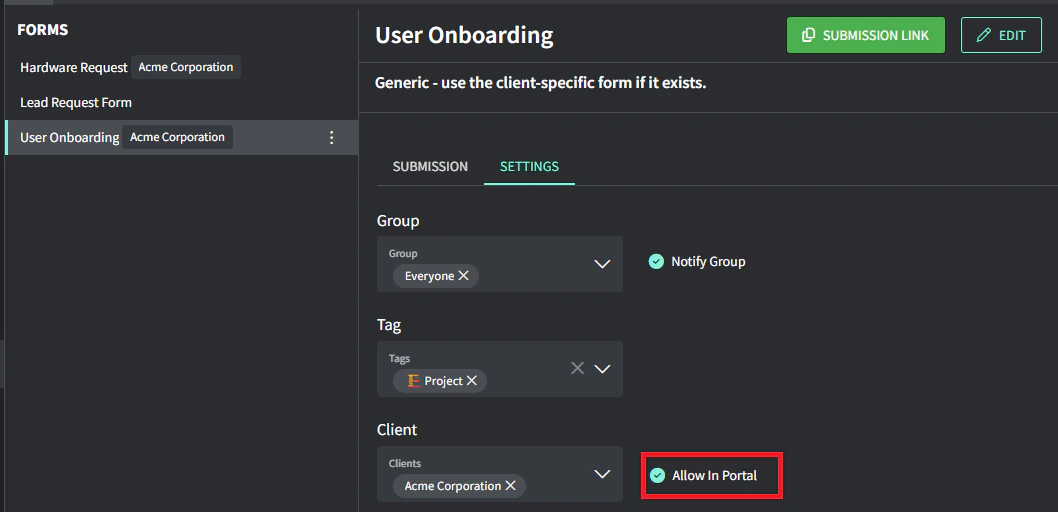
Forms can be published to the Client Portal for self-serve. If a Client is specified, then it will only be published to their portal. If no client is specified, then it will be published to the portal for ALL Clients.
Navigate to
Forms
from the menu
Select the form on the left
Select the ‘
Settings
’ tab
Toggle on ‘
Allow in portal
’ to publish this form to the client portal (for the specified clients)
Was this page helpful?
Yes
No
Previous
How passwords work
Description here
Next
⌘I
Assistant
Responses are generated using AI and may contain mistakes.