

- Create your own custom types.
- Require the selection on each ticket.
- Automatically assign the correct type via AI.
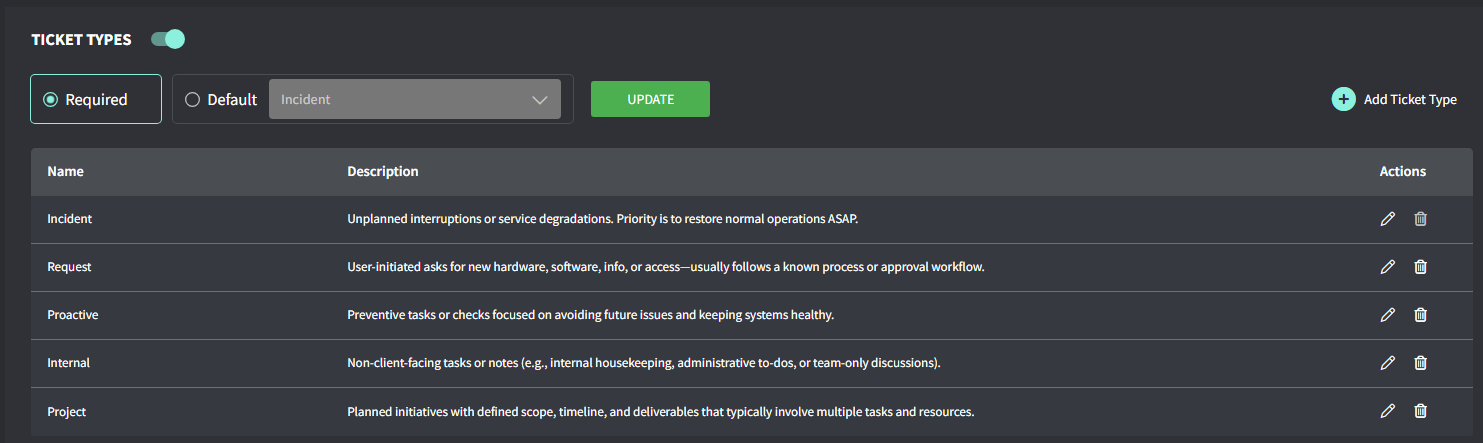
Enable ticket types
- Navigate to Settings > Tickets > Type.
- Toggle Ticket Type on.
- Select between Required or Default.
- Required: Ticket Type field will start blank and require selection via AI or manual entry.
- Default: The automation will prefill the Ticket Type field with incidents. You can change it via AI or manual entry if needed.
- Add/Edit Ticket Types if required
Assign a type to a ticket
- Open a ticket.
- In the right pane, check the Info tab.
- Scroll down to Types, and open the dropdown menu.
- Click the Type
Sort tickets by type
To sort tickets by type, leverage the View feature:- From the left general menu, open Tickets. A list of all your tickets appears.
- At the bottom of the left pane, click the option + Create View.
- Add a name and scroll down, click View Additional Fields.
- From the Ticket Type option, select the Type to filter tickets by.
- Scroll up to the top and click Save.