

- The conversation
- Status
- Assignees
- Time entries
- Products
- Related details
Ticket details page
A ticket details page contains the following sections: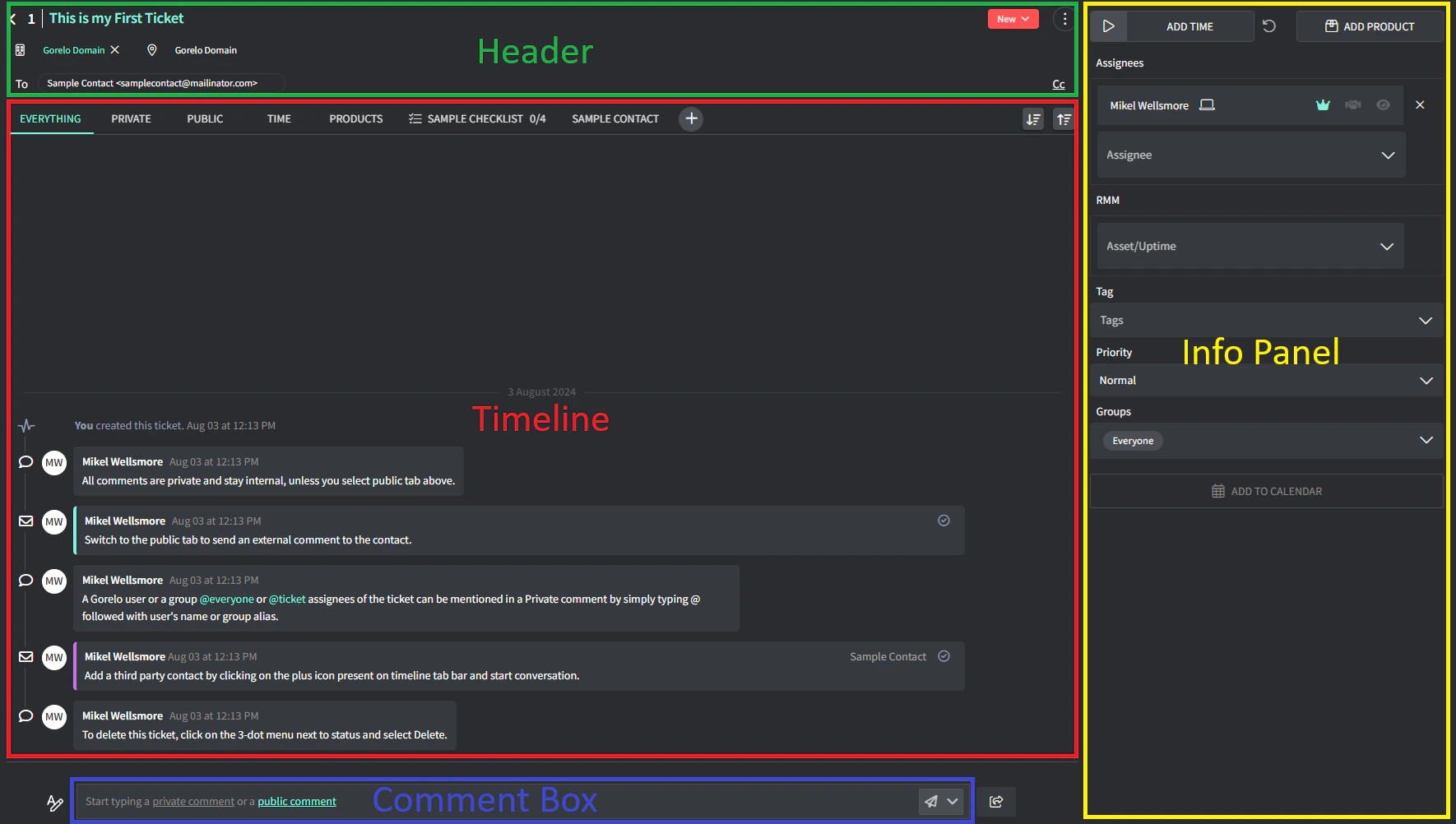
Header
The top area of a ticket shows the following details:- Ticket number: Automatically attributed, you can’t edit it.
- Ticket Title: Hover it and click the pencil icon to rename a ticket.
- Client and Location: Click the area to change it.
- To and Cc contacts: Click the area to add or remove contacts.
- Status: Click the label and scroll the options to change the status.
- Three dots menu with:
- The ticket link to share it.
- Merge with to merge the current ticket’s data into another ticket or a project task. The source ticket becomes part of the target ticket, decreasing the number of tickets.
- Billing to link the ticket to a contract.
- QR code label linked to the contract to print or view.
- Banner to set a banner over the ticket (for warnings, etc.).
- The option to mark the ticket as read/unread.
Timeline
The activity feed of a ticket that records all interactions and updates related to the ticket. It includes:- Timeline tabs
- Plus (+) button to add Third-party conversations, Shipment Tracking, Checklists and Approvals
- Timeline entries
Comment box
The editor where you write public or private comments and send updates on a ticket. Allows the following actions:- Click to type a private comment (anywhere not underlined)
- Click private comment to expand and type a private comment
- Click public comment to expand and type a public comment (sent via email)
- Ticket Shortcuts off to the far-right

Info panel
The side panel for operational details that allows you to:- Add time in two ways:
- Using the ticket time tracker: Click the start icon to launch a timer and track the time you spend on a ticket.
- Manually: Hover over the numbers and click ADD TIME to add the time spent on this ticket.
- Products
- Add/remove assignees
- Add/remove assets and uptime
- Add/remove tags
- Change priority
- Add/remove groups
- Add to calendar
Ticket statuses
Tickets in Gorelo have the following statuses that indicate where the ticket is in its lifecycle:You can’t manually change the status of a ticket to New.